Your workflow is unique 👨💻 - tell us how you use Dropbox here.
Forum Discussion

conalwn
2 years agoHelpful | Level 5
Getting a 'not enough Dropbox space' error, when I have plenty of space
Everyday I get this (see screenshot) on Mac Os when connecting any device to sync photos. "Not enough dropbox space" - Mac - But I have PLENTY of space.. and I see it on both of my macs but not my ip...
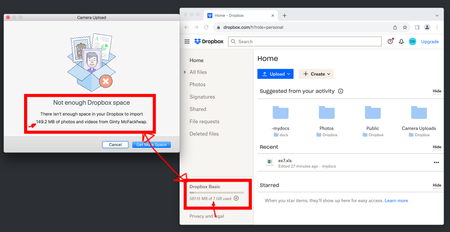
 2 years ago
Hi conalwn,
I'm happy to hear that everything is back in working order! It's possible that your cache wasn't properly clearing upon signing out and back in, which is the usual operation that would clear out the cached files causing this error message. This problem seems to have resolved itself while we were investigating.
For anyone else receiving this error message, sign out, then sign back in to clear your cached files. If that doesn't work, please let me know and we can take a deeper look!
Regards,
Ben

conalwn
2 years agoHelpful | Level 5
Thanks Patricio - I agree - but I tried freeing up space, and I did actually start by asking if this was an attempt to drive me on to a plan where I'm paying for additional space. But the thing that doesn't give me confidence is that newly paying members also see this issue so it looks far more like a bug. And I'm aware dropbox aren't especially rooted in fixing those issues right now. It could be that they are encouraging users to move to a different platform, rather than turfing them off.

Mark Super User II
2 years agoSuper User II
conalwn wrote:
Thanks Patricio - I agree - but I tried freeing up space, and I did actually start by asking if this was an attempt to drive me on to a plan where I'm paying for additional space. But the thing that doesn't give me confidence is that newly paying members also see this issue so it looks far more like a bug. And I'm aware dropbox aren't especially rooted in fixing those issues right now. It could be that they are encouraging users to move to a different platform, rather than turfing them off.
If you are getting a message saying its too big then its too big - this has ALWAYS been the case (correctly). However, the wording on it is a bit rubbish as if it says you need 3gb of space, for example, that means 3gb MORE not an account with 3gb in it - so actually its possible a free account may never ever be able to accept it if there total account limit is say 2gb. It doesnt say that either, unfortunately.
The only time quotas have been off on the website is if people have used backup: www.dropbox.com/backups
- conalwn2 years agoHelpful | Level 5
Hey Mark
You've missed the first few thread entries that detail the issue.
I can completely clean out my entire dropbox on mac so that I have 8GB available.
I plug in iphone to import, say, 200MB of photos and I get 'out of space' on the mac client.
Yet if I sign out of the account on mac, and then back in again, the import will work.
And signing out and in again everytime I attach my phone to my mac is not a workable solution.
- BenDBX2 years ago
Community Manager
Thanks for your patience while we looked into this. I've been informed that this requires an account-specific solution in running a terminal command. Would you mind if I reached out to you via email to provide you with the information you need?
Regards,
Ben
About Storage Space
Looking for help with managing the storage space in your Dropbox account? Talk to the Dropbox Community and get advice from members.
The Dropbox Community team is active from Monday to Friday. We try to respond to you as soon as we can, usually within 2 hours.
If you need more help you can view your support options (expected response time for an email or ticket is 24 hours), or contact us on X, Facebook or Instagram.
For more info on available support options for your Dropbox plan, see this article.
If you found the answer to your question in this Community thread, please 'like' the post to say thanks and to let us know it was useful!


