Your workflow is unique 👨💻 - tell us how you use Dropbox here.
Forum Discussion

Fridtjof1
2 years agoExplorer | Level 4
Hard drive is full, even though the files are online only.
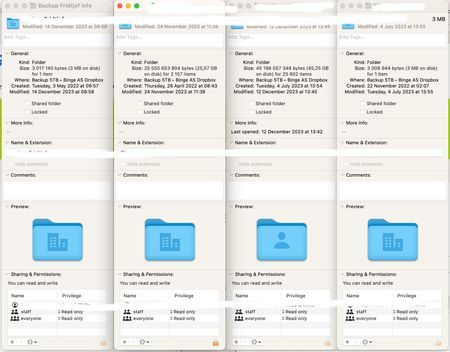
I have made lots of files online only to free up space on my hard drive, but dropbox has stopped syncing claiming that there is not enough disk space.
The top level folder says that it has 5TB of c...

stephaniediffin
1 year agoNew member | Level 2
I have made all of my dropbox folders online only but my computer's storage is still full from files that it says are from dropbox. These are shared files from an organization so I'm afraid to delete them from my computer but they've taken over my entire hard drive. And, every workaround I've tried from dropbox has not solved the issue.

Hannah Dropbox Community Moderator
1 year agoDropbox Community ModeratorHey stephaniediffin, sorry to hear about this.
Are you on a Windows or a Mac computer?
What's the Dropbox app's current syncing status and version, when you hover your mouse over the Dropbox icon?
And lastly, can you let us know what steps you've tried so far?
Thanks in advance.
About Storage Space
Looking for help with managing the storage space in your Dropbox account? Talk to the Dropbox Community and get advice from members.
The Dropbox Community team is active from Monday to Friday. We try to respond to you as soon as we can, usually within 2 hours.
If you need more help you can view your support options (expected response time for an email or ticket is 24 hours), or contact us on X, Facebook or Instagram.
For more info on available support options for your Dropbox plan, see this article.
If you found the answer to your question in this Community thread, please 'like' the post to say thanks and to let us know it was useful!


