Your workflow is unique 👨💻 - tell us how you use Dropbox here.
Forum Discussion

Mary Ann B.
5 years agoHelpful | Level 5
How to calculate ALL folder sizes at once
How do I calculate the size of ALL folders at once? I followed various instruction on this forum but none seem to work for me. First, I have selected 'size' as one of my column headers. Then, I se...
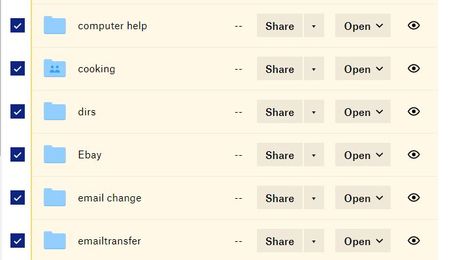
- 5 years ago
Hey Mary Ann B. - I'd be happy to help.
Can you see an ellipsis button on the far right side of the page, underneath the preview pane?
Let me know what you find, thanks!

Mary Ann B.
5 years agoHelpful | Level 5
Brilliant - that worked! Thanks for your help.

Lusil Dropbox Staff
5 years agoDropbox StaffAnytime, Mary Ann B.
- Mary Ann B.5 years agoHelpful | Level 5
I closed Dropbox and just returned and the file sizes are gone. In addition, if I clicked on the ellipses, either on one folder or all folders, there is no option to calculate size. What am I doing wrong now???
- Daphne5 years ago
Dropbox Community Moderator
Sorry to hear you're having trouble with this still Mary Ann B.!
It may be that the cache was cleared when Dropbox was closed, which might cause the need to re-calculate the folder sizes.
Is it possible that the column changed from "Size" back to "Modified"? Or perhaps there is an individual file selected with the folders too?
Keep me posted!
- Mary Ann B.5 years agoHelpful | Level 5
You are an *excellent* diagnostician. Both of those things contributed to my difficulty. Thanks for your help.

About Storage Space
Looking for help with managing the storage space in your Dropbox account? Talk to the Dropbox Community and get advice from members.
The Dropbox Community team is active from Monday to Friday. We try to respond to you as soon as we can, usually within 2 hours.
If you need more help you can view your support options (expected response time for an email or ticket is 24 hours), or contact us on X, Facebook or Instagram.
For more info on available support options for your Dropbox plan, see this article.
If you found the answer to your question in this Community thread, please 'like' the post to say thanks and to let us know it was useful!


