We’re Still Here to Help (Even Over the Holidays!) - find out more here.
Forum Discussion

11235813
9 months agoExplorer | Level 3
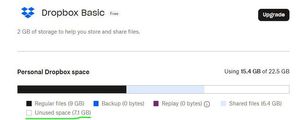
I got a notification saying I'm out of space, but I still have 7GB left on my Dropbox account.
Hi There,
A notification says "You're account is currently out of space and has stopped syncing", however My Account shows I have my used 15.4GB out of 22.5GB, complete with a section marked Unused...

11235813
9 months agoExplorer | Level 3
Thanks Nancy. I have the App on PC and Mobile; no errors when uploading from each device files just now. The new files are showing in the Mobile App but not on the PC's via File Explorer.
Hope this helps
VBest Simon H

Walter Dropbox Community Moderator
9 months agoDropbox Community ModeratorHi from me too 11235813 - can you clarify the Dropbox desktop app's exact status as shown in your system tray as well?
About Storage Space
Looking for help with managing the storage space in your Dropbox account? Talk to the Dropbox Community and get advice from members.
The Dropbox Community team is active from Monday to Friday. We try to respond to you as soon as we can, usually within 2 hours.
If you need more help you can view your support options (expected response time for an email or ticket is 24 hours), or contact us on X, Facebook or Instagram.
For more info on available support options for your Dropbox plan, see this article.
If you found the answer to your question in this Community thread, please 'like' the post to say thanks and to let us know it was useful!


