Your workflow is unique 👨💻 - tell us how you use Dropbox here.
Forum Discussion

Ben44
1 year agoExplorer | Level 4
I updated the Dropbox app on my Mac and now it's trying to re-download all of my online files
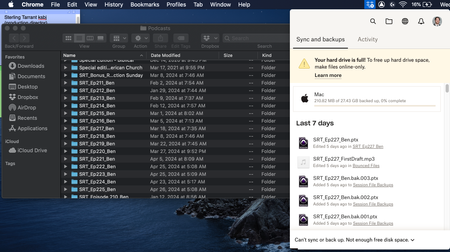
Hey, so I recently updated dropbox, and now it's seemingly trying to redownload all of my online only files.
Obviously I don't have that much storage, and I don't even have the option to m...

Nancy Dropbox Community Moderator
1 year agoDropbox Community ModeratorHi Ben44, and thanks for posting this on our Community today.
Can you send over a few more details on the update that led to this? Are you referring to the Dropbox Backup update perhaps?
If yes, then this may be expected behavior, as described here.
Keep me posted.

Ben44
1 year agoExplorer | Level 4
Yes that sounds familiar. There’s no way I can redownload all of my files then, is there a way I can skip the backup or maybe use an external hard drive?
- Nancy1 year ago
Would you like to move your local Dropbox folder to the external drive, or disable Dropbox Backup and move your currently backed up files to the drive instead?
Just to make sure we’re on the same page and I provide you with the correct guidance.
- Ben441 year agoExplorer | Level 4I want it to stop trying to backup my computer because I don’t have enough storage to hold everything. I want it to go back to before the backup started so I can access online only files. Thank you

About Storage Space
Looking for help with managing the storage space in your Dropbox account? Talk to the Dropbox Community and get advice from members.
The Dropbox Community team is active from Monday to Friday. We try to respond to you as soon as we can, usually within 2 hours.
If you need more help you can view your support options (expected response time for an email or ticket is 24 hours), or contact us on X, Facebook or Instagram.
For more info on available support options for your Dropbox plan, see this article.
If you found the answer to your question in this Community thread, please 'like' the post to say thanks and to let us know it was useful!


