Your workflow is unique 👨💻 - tell us how you use Dropbox here.
Forum Discussion

Ben44
1 year agoExplorer | Level 4
I updated the Dropbox app on my Mac and now it's trying to re-download all of my online files
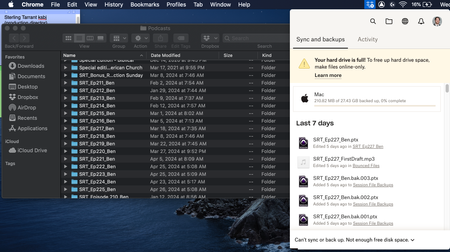
Hey, so I recently updated dropbox, and now it's seemingly trying to redownload all of my online only files.
Obviously I don't have that much storage, and I don't even have the option to m...

Ben44
1 year agoExplorer | Level 4
I want it to stop trying to backup my computer because I don’t have enough storage to hold everything. I want it to go back to before the backup started so I can access online only files. Thank you

Megan Dropbox Community Moderator
1 year agoDropbox Community ModeratorHey Ben44, did you get an error when trying out the steps that Nancy provided in her previous response, in order to disable your Backup?
- Ben441 year agoExplorer | Level 4
Hi, thank you for helping me. I disabled and deleted my backup, but it's still saying that it's unable to 'sync' because I don't have enough space on my computer. I restarted dropbox, and it keeps saying the same thing. And I still can't make things online only. I don't want it to keep downloading things, and I don't want to delete my files because I want them to be on dropbox
- Nancy1 year ago
Are you seeing your previously backed up files locally on your hard drive now? Are they all local?
If yes, and they’re the ones taking up most of your computer’s hard drive space, you can try moving them to your external drive, like you suggested above.
Another option, if you’re not accessing all of your Dropbox folders frequently on your computer, is to remove the largest from your hard drive via selective sync and only access them on www.dropbox.com. This way, syncing should also resume.
- Ben441 year agoExplorer | Level 4
I am not seeing a backup, because I've never backed up before. I have a ton of files on my computer because of my work, but I keep them online only normally. And I can't just move my big files to an external drive because they're in folders with other audio that hasn't synced yet. I work on podcasts and it won't let me move the unsynced audio
As I mentioned originally, I've already messed with selective sync and that didn't help at all. As you can see below, I've deselected everything, including all the folders you can't see because of the scroll bar. It's still trying to sync all of my old files.

About Storage Space
Looking for help with managing the storage space in your Dropbox account? Talk to the Dropbox Community and get advice from members.
The Dropbox Community team is active from Monday to Friday. We try to respond to you as soon as we can, usually within 2 hours.
If you need more help you can view your support options (expected response time for an email or ticket is 24 hours), or contact us on X, Facebook or Instagram.
For more info on available support options for your Dropbox plan, see this article.
If you found the answer to your question in this Community thread, please 'like' the post to say thanks and to let us know it was useful!


