Your workflow is unique 👨💻 - tell us how you use Dropbox here.
Forum Discussion

KJWSr
1 month agoExplorer | Level 4
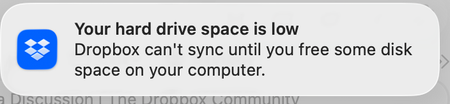
My macOS desktop app gives me an incorrect low disk space error message.
Dropbox Plan
Professional Device
M1 iMac Operating System/Browser (if using the web)
MacOS Tahoe Dropbox App Version (if using the app)
238.4.6305
Question or Issue
My Deskto A...

Rich Super User II
1 month agoSuper User IIKJWSr wrote:My Deskto App is showing that I'm using 4 TB of 4 TB. My online account shows that I'm using 2.76 TB of 4 TB. The online info is correct. The info from the desktop is wrong.
That message isn't referring to the available space in your account. It's referring to the available space on your local hard drive. You're hard drive is full, so Dropbox is not able to sync.

KJWSr
1 month agoExplorer | Level 4
My Dropbox folder is on a 4TB external SSD. There is nothing else on the drive. The physical drive has 1.19 TB of available space.
- Nancy1 month ago
Dropbox Community Moderator
Thanks for the screenshots, KJWSr! Do you mind right-clicking on your local Dropbox folder as well, and sending me a screenshot of what you see after selecting the "Get info" option?
 KJW_SR1 month agoExplorer | Level 3
Hi - I’m going to send 3 images. The first is the Get info screen you requested. It never gets beyond calculating size. The second is the full Finder screen of the Drop Box folder, note the data info at the bottom. Last image is the Finder screen of the actual drive. Note that Dropbox is the only thing on the drive and also the data info at the bottom.
Thanks!


About Storage Space
Looking for help with managing the storage space in your Dropbox account? Talk to the Dropbox Community and get advice from members.
The Dropbox Community team is active from Monday to Friday. We try to respond to you as soon as we can, usually within 2 hours.
If you need more help you can view your support options (expected response time for an email or ticket is 24 hours), or contact us on X, Facebook or Instagram.
For more info on available support options for your Dropbox plan, see this article.
If you found the answer to your question in this Community thread, please 'like' the post to say thanks and to let us know it was useful!


