Your workflow is unique 👨💻 - tell us how you use Dropbox here.
Forum Discussion

salageanandrey
2 years agoNew member | Level 2
Not enough space but the app says otherwise.
I've create my account a really long time ago and at that point I've received this amount of space. The app still displays this amount of space, but at the same time it tells me that I don't h...
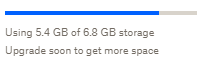
- 2 years ago
Hi salageanandrey, and sorry for jumping in.
It's kind of expected to see this message/notification once your Dropbox account gets close to its quota limit.
Did you try to add a small file/folder to your Dropbox account and it couldn't sync/get uploaded?


Megan Dropbox Community Moderator
2 years agoDropbox Community ModeratorHi salageanandrey, thanks for the speedy reply!
Can you also check your plan page online, to see what it reports?
As for the app, it should be syncing without any issues since you have enough available space, so can you clarify its syncing status at the moment?

salageanandrey
2 years agoNew member | Level 2
this is what I see for the plan.
- Nancy2 years ago
Hi salageanandrey, and sorry for jumping in.
It's kind of expected to see this message/notification once your Dropbox account gets close to its quota limit.
Did you try to add a small file/folder to your Dropbox account and it couldn't sync/get uploaded?
- salageanandrey2 years agoNew member | Level 2
thanks for the answer.
I can confirm that files are still syncronizing. I was just confused by the limited storage message.
Thanks again for all the help.
- Nancy2 years ago
About Storage Space
Looking for help with managing the storage space in your Dropbox account? Talk to the Dropbox Community and get advice from members.
The Dropbox Community team is active from Monday to Friday. We try to respond to you as soon as we can, usually within 2 hours.
If you need more help you can view your support options (expected response time for an email or ticket is 24 hours), or contact us on X, Facebook or Instagram.
For more info on available support options for your Dropbox plan, see this article.
If you found the answer to your question in this Community thread, please 'like' the post to say thanks and to let us know it was useful!


