We’re Still Here to Help (Even Over the Holidays!) - find out more here.
Forum Discussion

Lageole
3 years agoHelpful | Level 5
Real folder size won't show in Finder
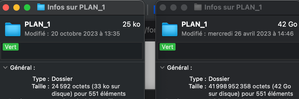
Hello, I am looking to resolve an issue I'm just experiencing now for the first time. When I do a command + i to see the size of a dropbox folder on my finder, the finder now just show me the s...

Lageole
3 years agoHelpful | Level 5
Hello,
Just doing a little up to the post !
Thank you !

Walter Dropbox Community Moderator
3 years agoDropbox Community ModeratorHey Lageole - thank for the nudge!
I just wanted to mention that since you're on a version past Mac OS 12.3, it's likely that you're facing what's described in the post you linked indeed.
Let us know if you have anything else to ask or add.
- Lageole3 years agoHelpful | Level 5
Hello Walter,
Noted ! That's what I was dreading 😞But it raised some questions and feedbacks,
Firstly, I have access on my user interface to the option we were talking about that would allow to choose. Why isn't this choice effective?
Secondly, the size calculation tool on dropbox.com is unusable because it gives different sizes from what I observe on the same file locally (local folder gives 42 go via the finder and its online calculation 39...). The tool don't give also some crucial information like the number of elements of a folder.
Finally, and if I've understood correctly, this is a change in the way dropbox works. I have to report that the removal of this option/tool is dramatic for the business I run (and that I think many users run, since we edit video content).
We need to be able to accurately check the size of a folder, whether it's online or offline. We can't afford to have to put a folder locally every time we want to check its size. We work with files that are hundreds of gigabytes in size, and these checks are essential (back-up, shooting reports, content verification with suppliers, etc.). This is what makes dropbox attractive to audiovisual content creators.
So if this is indeed a deliberate change, please let development know that it's a change that makes dropbox almost unusable for our business, and will potentially push us to look for a new cloud storage solution, or servers, NAS etc.
If it's temporary, do you know when update are gonna come to fixe this issue ?Thank you !
- Lageole3 years agoHelpful | Level 5
Thank you !
Do you know if an update is scheduled soon ? Or if this new API mac update could change this issue ?
Thanks again 🙂

About Storage Space
Looking for help with managing the storage space in your Dropbox account? Talk to the Dropbox Community and get advice from members.
The Dropbox Community team is active from Monday to Friday. We try to respond to you as soon as we can, usually within 2 hours.
If you need more help you can view your support options (expected response time for an email or ticket is 24 hours), or contact us on X, Facebook or Instagram.
For more info on available support options for your Dropbox plan, see this article.
If you found the answer to your question in this Community thread, please 'like' the post to say thanks and to let us know it was useful!


