Your workflow is unique 👨💻 - tell us how you use Dropbox here.
Forum Discussion

Stardrop
1 year agoNew member | Level 1
The Dropbox app on Mac OS can't sync as it's saying my hard drive is full, when it isn't
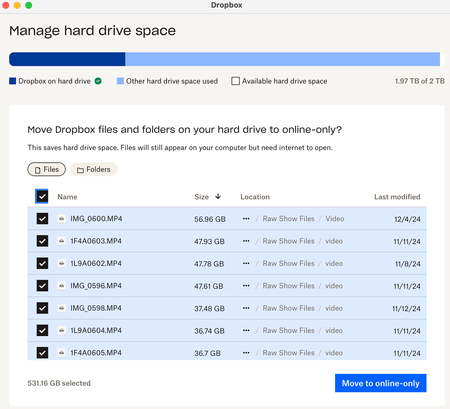
I'm currently unable to sync several video files (approx 120GB) locally due to dropbox thinking it has no space, even though I see over 800GB of available space on my drive. I'm on a teams account a...

Stardrop
1 year agoNew member | Level 1
Thanks Jay - there isn't an error message. Only that it's not syncing files that it shows as being "online." Please see attached.

Jay Dropbox Community Moderator
1 year agoDropbox Community ModeratorWhen you click on the Dropbox icon on the menu bar, what is the current status of the app as it appears on the bottom left?
- Stardrop1 year agoNew member | Level 1
It is syncing, though it's not giving my any estimates or specifics beyond that. Hard drive space appears to be fluctuating... I've had to make other files online only to free up available space but I can't tell if the two files I need to sync are downloading or if other syncing is taking place. Very frustrating.
- Jay1 year ago
Could you try rebooting the Mac entirely to see if this helps?
- Stardrop1 year agoNew member | Level 1
I've rebooted a few times. That said, at this point, the issue appears to be resolved and I'm able to sync those two files. However, I'd love to know what is up with the discrepancy between "available disk space" and "disk space being used" under the "manage hard drive space" window. And if it's a matter of resetting the cache, how that would be done.
About Storage Space
Looking for help with managing the storage space in your Dropbox account? Talk to the Dropbox Community and get advice from members.
The Dropbox Community team is active from Monday to Friday. We try to respond to you as soon as we can, usually within 2 hours.
If you need more help you can view your support options (expected response time for an email or ticket is 24 hours), or contact us on X, Facebook or Instagram.
For more info on available support options for your Dropbox plan, see this article.
If you found the answer to your question in this Community thread, please 'like' the post to say thanks and to let us know it was useful!


