We’re Still Here to Help (Even Over the Holidays!) - find out more here.
Forum Discussion

bequibar
12 months agoNew member | Level 1
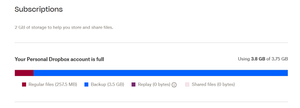
Why is Dropbox Backup using up 3.5 GB? How can I check what's taking up storage?
Hi,
I'm one of the users who suddenly lost god knows how much storage space and Dropbox stopped syncing, even though I keep almost nothing in those folders.
I've tried deleting all the shared fo...
- 12 months ago
Dropbox backup is.... as it says ;)
You cannot view that via the usual web interface so go to www.dropbox.com/backups to see it and if you dont need it considering disabling it via https://help.dropbox.com/organize/how-to-use-dropbox-backup


bequibar
12 months agoNew member | Level 1
About Storage Space
Looking for help with managing the storage space in your Dropbox account? Talk to the Dropbox Community and get advice from members.
The Dropbox Community team is active from Monday to Friday. We try to respond to you as soon as we can, usually within 2 hours.
If you need more help you can view your support options (expected response time for an email or ticket is 24 hours), or contact us on X, Facebook or Instagram.
For more info on available support options for your Dropbox plan, see this article.
If you found the answer to your question in this Community thread, please 'like' the post to say thanks and to let us know it was useful!


