Your workflow is unique 👨💻 - tell us how you use Dropbox here.
Forum Discussion

uksteveharris
5 months agoNew member | Level 2
After an update the desktop app keeps indexing everything
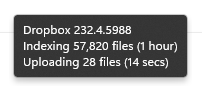
Dropbox has just updated to v232.4.5988 and it is now indexing nearly 1.5TB of data!!!!
What is going on??
I'm running Windows 11 Home v24H2
OS Build 26100.6584
It is constantly saying "Inde...
 5 months ago
Well, firstly most updates with Dropbox don't do a massive reindex so something has definitely changed with this specific update... after 4 hours the indexing finished.
The question is why? Why when everything was 100% in sync before the v232.4.5988 update was there ANY need for the indexing?
I cannot be the only person that has had this hassle. My wife's laptop is now doing the exact same thing right now (it has my Dropbox account on it)
Someone somewhere did not do their job properly...
uksteveharris
5 months agoNew member | Level 2
Well, firstly most updates with Dropbox don't do a massive reindex so something has definitely changed with this specific update... after 4 hours the indexing finished.
The question is why? Why when everything was 100% in sync before the v232.4.5988 update was there ANY need for the indexing?
I cannot be the only person that has had this hassle. My wife's laptop is now doing the exact same thing right now (it has my Dropbox account on it)
Someone somewhere did not do their job properly...

Megan Dropbox Community Moderator
5 months agoDropbox Community ModeratorHey uksteveharris!
After the Windows cloud files update, the Dropbox desktop app may re-sync content because the update introduces a new sync engine that requires a migration of your files to be compatible with the new Cloud Files API. This migration process can trigger a re-sync of your files to ensure everything is properly updated and integrated with the new system.
In any case, I'm happy to see that your issue is now resolved!
I'll be one post away if you need anything else. Thanks! 🤓
About Apps and Installations
Have a question about a Dropbox app or installation? Reach out to the Dropbox Community and get solutions, help, and advice from members.
The Dropbox Community team is active from Monday to Friday. We try to respond to you as soon as we can, usually within 2 hours.
If you need more help you can view your support options (expected response time for an email or ticket is 24 hours), or contact us on X, Facebook or Instagram.
For more info on available support options for your Dropbox plan, see this article.
If you found the answer to your question in this Community thread, please 'like' the post to say thanks and to let us know it was useful!


