Your workflow is unique 👨💻 - tell us how you use Dropbox here.
Forum Discussion

mattmireles
7 years agoExplorer | Level 3
Attaching Dropbox files to Emails on iPhone X Suddenly Stopped Working
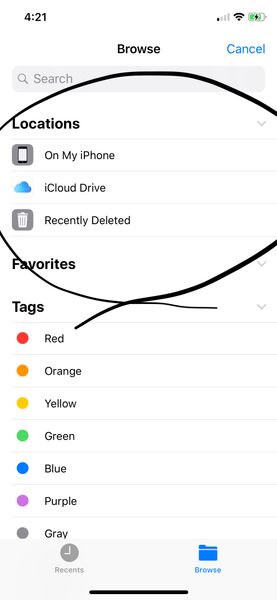
Up until recently, I was able to attach files from Dropbox to my emails on my iPhone X. I use Polymail and Apple Mail. However, recently, the attachment dialogue stopped showing Dropbox as an option ...
 7 years ago
Hi there,
Apologies for the trouble with the Dropbox and Files.app integration. Could you try opening the Files app directly, going into the “Edit” menu in the upper right, then re-enabling the Dropbox integration?
We have heard reports that when people uninstall and re-install the Dropbox app, or when they do an iCloud restore, this integration needs to be re-enabled manually.
Let us know if that works!
simtan Dropbox Staff
7 years agoDropbox StaffHi there,
Apologies for the trouble with the Dropbox and Files.app integration. Could you try opening the Files app directly, going into the “Edit” menu in the upper right, then re-enabling the Dropbox integration?
We have heard reports that when people uninstall and re-install the Dropbox app, or when they do an iCloud restore, this integration needs to be re-enabled manually.
Let us know if that works!

Emilio Agrofino
5 years agoExplorer | Level 4
Hi,
This solution does not work for me. I have it all marked up properly but a message saying "contents unavailable, the folder contents could not be displayed because of an unknown error." It was working fine until two days ago. The dropbox app is ok. The problem is the integration with files.app and apple mail.
- Walter5 years ago
Dropbox Community Moderator
Hi Emilio Agrofino; welcome to our Community!
Can you please let us know which exact version of the mobile app you're using on the affected device?
Also, could you remove Dropbox as a location from your Files app and then re-add it? This might do the trick for you.
In any case, please keep us posted, Emilio.
- Emilio Agrofino5 years agoExplorer | Level 4
My problem is with an IPAD.
My IPAD is IPAD PRO 12.9 inches (3rd generation).
The Dropbox App Version is the 202.3.2
I have tried removing from files and then re-adding several times, even before sending this message.
As mentioned, it was working fine and then one day it simply did not work. Maybe due to an automatic update of Dropbox?
Please let me know. Thanks
- Walter5 years ago
I can see you've connected a business account with your personal one Emilio Agrofino.
Do you have this problem with both accounts or just one of them?
In the meantime, can you offline and/or export those files to your iPad's mail app perhaps?

About Apps and Installations
Have a question about a Dropbox app or installation? Reach out to the Dropbox Community and get solutions, help, and advice from members.
The Dropbox Community team is active from Monday to Friday. We try to respond to you as soon as we can, usually within 2 hours.
If you need more help you can view your support options (expected response time for an email or ticket is 24 hours), or contact us on X, Facebook or Instagram.
For more info on available support options for your Dropbox plan, see this article.
If you found the answer to your question in this Community thread, please 'like' the post to say thanks and to let us know it was useful!


