Your workflow is unique 👨💻 - tell us how you use Dropbox here.
Forum Discussion

mattmireles
7 years agoExplorer | Level 3
Attaching Dropbox files to Emails on iPhone X Suddenly Stopped Working
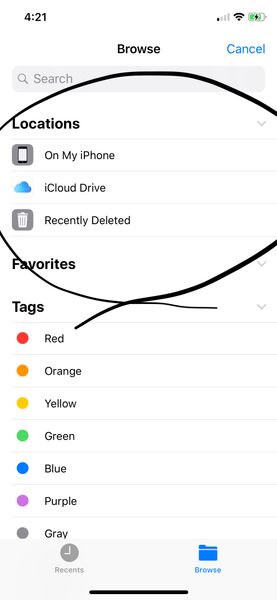
Up until recently, I was able to attach files from Dropbox to my emails on my iPhone X. I use Polymail and Apple Mail. However, recently, the attachment dialogue stopped showing Dropbox as an option ...
 7 years ago
Hi there,
Apologies for the trouble with the Dropbox and Files.app integration. Could you try opening the Files app directly, going into the “Edit” menu in the upper right, then re-enabling the Dropbox integration?
We have heard reports that when people uninstall and re-install the Dropbox app, or when they do an iCloud restore, this integration needs to be re-enabled manually.
Let us know if that works!

Jane Dropbox Staff
7 years agoDropbox StaffHey aileentan85, apologies for getting back to you in delay. Are you still facing this issue?

aileentan85
5 years agoExplorer | Level 3
@Jane, problem fixed! Thanks.
About Apps and Installations
Have a question about a Dropbox app or installation? Reach out to the Dropbox Community and get solutions, help, and advice from members.
The Dropbox Community team is active from Monday to Friday. We try to respond to you as soon as we can, usually within 2 hours.
If you need more help you can view your support options (expected response time for an email or ticket is 24 hours), or contact us on X, Facebook or Instagram.
For more info on available support options for your Dropbox plan, see this article.
If you found the answer to your question in this Community thread, please 'like' the post to say thanks and to let us know it was useful!

