Your workflow is unique 👨💻 - tell us how you use Dropbox here.
Forum Discussion

mrothen828
2 years agoExplorer | Level 3
Contextual Menus Exists (Mac OS) - But half do not work
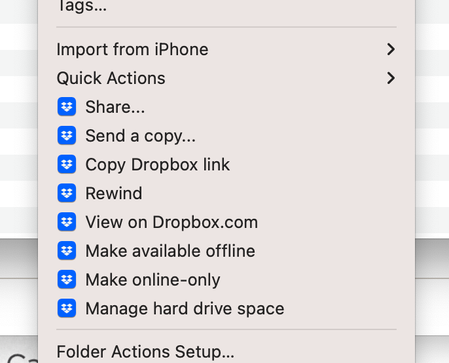
My contextual menus are there, but several options do not work - I've tried everything under the hood, but no success
Share (not working)
Send a Copy (working)
Copy Dropbox Link (not working)
...
- 2 years ago
Hi mrothen828, I see, no worries.
What about the OS update, did you recently go through with one?
I'd also suggest that you try an advanced reinstall as our last resort here.

Megan Dropbox Community Moderator
2 years agoDropbox Community ModeratorHi mrothen828, I see, no worries.
What about the OS update, did you recently go through with one?
I'd also suggest that you try an advanced reinstall as our last resort here.

mrothen828
2 years agoExplorer | Level 3
Good News! The advanced reinstall seemed to do the trick!
- Megan2 years ago
Now that's amazing news mrothen828!
Glad to know everything is back on track! Let me know if you need anything else! 😎
About Apps and Installations
Have a question about a Dropbox app or installation? Reach out to the Dropbox Community and get solutions, help, and advice from members.
The Dropbox Community team is active from Monday to Friday. We try to respond to you as soon as we can, usually within 2 hours.
If you need more help you can view your support options (expected response time for an email or ticket is 24 hours), or contact us on X, Facebook or Instagram.
For more info on available support options for your Dropbox plan, see this article.
If you found the answer to your question in this Community thread, please 'like' the post to say thanks and to let us know it was useful!


