We’re Still Here to Help (Even Over the Holidays!) - find out more here.
Forum Discussion

Sergiolopezfineart
3 years agoExplorer | Level 4
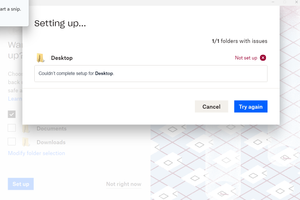
"Couldn't complete setup" error message when setting up Dropbox Backup
If I click "try again" it just continues to give me the same error. The previous screen was this:
If I click "not right now," it just sends me to my Dropbox folder on my computer.

Hannah Dropbox Community Moderator
3 years agoDropbox Community ModeratorThanks for the screenshots, Sergio.
Can you click on the "Try Dropbox Backup" button in that page that I gave you, to see if that allows you to set up your backups?

Sergiolopezfineart
3 years agoExplorer | Level 4
Hannah I end up exactly where I started. Here is the exact sequence of events:
I click on the button:
I click on "Open Dropbox" and this is the next screen I see:
I click on "Set up":
And I get the same exact error that sent me here.
About Apps and Installations
Have a question about a Dropbox app or installation? Reach out to the Dropbox Community and get solutions, help, and advice from members.
The Dropbox Community team is active from Monday to Friday. We try to respond to you as soon as we can, usually within 2 hours.
If you need more help you can view your support options (expected response time for an email or ticket is 24 hours), or contact us on X, Facebook or Instagram.
For more info on available support options for your Dropbox plan, see this article.
If you found the answer to your question in this Community thread, please 'like' the post to say thanks and to let us know it was useful!


