We’re Still Here to Help (Even Over the Holidays!) - find out more here.
Forum Discussion

Sergiolopezfineart
3 years agoExplorer | Level 4
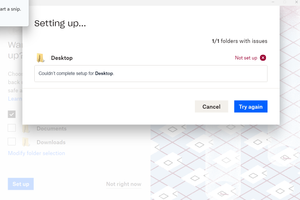
"Couldn't complete setup" error message when setting up Dropbox Backup
If I click "try again" it just continues to give me the same error. The previous screen was this:
If I click "not right now," it just sends me to my Dropbox folder on my computer.

Sergiolopezfineart
3 years agoExplorer | Level 4
I haven't had the chance to work on it further since the last message

Graham Community Manager
3 years agoCommunity Manager
Thanks for the reply! Please don't hesitate to reach out again if you are still experiencing any issues when you get a chance to have another look.
Have a great day!
Graham
- Sergiolopezfineart3 years agoExplorer | Level 4
Graham I'm still getting this same issue
- Jay3 years ago
Dropbox Community Moderator
Since you were able to migrate the Documents folder, it could mean that you found an app or service which prevent it from being moved previously.
Are you certain that all apps and services have been exited before trying to set up the computer backup for the Desktop folder?
- Sergiolopezfineart3 years agoExplorer | Level 4
Jay Yes. I closed everything I could, went through the steps again, and am still having the same issue.
- Jay3 years ago
Thanks for the info, Could you try rebooting the device and immediately trying the computer backup setup for this folder?
- Sergiolopezfineart3 years agoExplorer | Level 4Just tried it and there was no change in outcome.
- Megan3 years ago
Hi Sergiolopezfineart, which OS do you currently use?
Also, I would like for you to locate your Dropbox icon, next to your WiFi and hover your mouse there. You should be able to see the version of the app there. Can you check, and let me know?
- Sergiolopezfineart3 years agoExplorer | Level 4
Megan Windows 11, Dropbox version 166.4.2920
- Walter3 years ago
Hey Sergiolopezfineart, thanks for clarifying that for us.
Would it be OK if we reached out via email to have a further look internally at this point?
- Sergiolopezfineart3 years agoExplorer | Level 4
Yes, you can reach me at [removed per the Community's Guidelines]
- Walter3 years ago
Sure thing, Sergio. You've got



About Apps and Installations
Have a question about a Dropbox app or installation? Reach out to the Dropbox Community and get solutions, help, and advice from members.
The Dropbox Community team is active from Monday to Friday. We try to respond to you as soon as we can, usually within 2 hours.
If you need more help you can view your support options (expected response time for an email or ticket is 24 hours), or contact us on X, Facebook or Instagram.
For more info on available support options for your Dropbox plan, see this article.
If you found the answer to your question in this Community thread, please 'like' the post to say thanks and to let us know it was useful!


