Our Community is in read-only mode until April 8th, learn more here. You can still search existing threads or get help via Dropbox Support, the Dropbox Help Center, or Learn.
Forum Discussion

hshupe16
2 years agoHelpful | Level 6
Desktop folder icons look different when compared to online folders
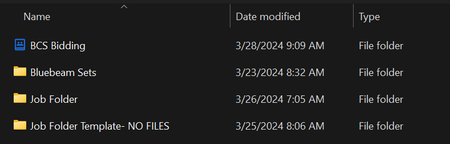
Hello! See the blue folder icon above. This differs throughout our organization and online. I would think this means a shared folder but in the online version this folder shows that it's a...
 1 year ago
I was able to solve the problem. I had to open the registry editor on my computer.

Jay Dropbox Community Moderator
2 years agoDropbox Community ModeratorHi hshupe16, thanks for messaging the Community!
How does the folder appear on the Dropbox site?
could you attach a screenshot showing this for us?
This will help me to assist further!
- hshupe162 years agoHelpful | Level 6
Hi Jay,
Thank you for getting back to me. See below:
So, the weird thing is this folder is on all of our DB organization's desktops but my boss is the only one who has this BCS bidding folder blue icon in the app. Below is what mine looks like in the app:
Thank you,
About Apps and Installations
Have a question about a Dropbox app or installation? Reach out to the Dropbox Community and get solutions, help, and advice from members.
The Dropbox Community team is active from Monday to Friday. We try to respond to you as soon as we can, usually within 2 hours.
If you need more help you can view your support options (expected response time for an email or ticket is 24 hours), or contact us on X, Facebook or Instagram.
For more info on available support options for your Dropbox plan, see this article.
If you found the answer to your question in this Community thread, please 'like' the post to say thanks and to let us know it was useful!


