Your workflow is unique 👨💻 - tell us how you use Dropbox here.
Forum Discussion

attafox
2 years agoExplorer | Level 3
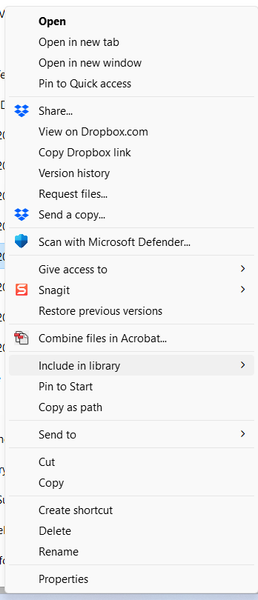
Don't see online only option in the context menu
We have a paid subscription for Dropbox Family, and for any folder (inside or outside the Family Room), do not see an option for either a file or folder to make Online Only. Running Windows 10. Scree...

attafox
2 years agoExplorer | Level 3
Hi Jay. I had already tried reinstalling the Dropbox app as an attempt to solve. So that didn’t work.
And I have also tried accessing via the explorer icon as well as the Dropbox icon and then directly from the apps menu. None work.
And I have also tried accessing via the explorer icon as well as the Dropbox icon and then directly from the apps menu. None work.
- Jay2 years ago
Dropbox Community Moderator
When you originally installed the Dropbox desktop application, did you install it with admin privileges?
Is this a company-managed device, or a personal machine?
- attafox2 years agoExplorer | Level 3Personal
- Nancy2 years ago
Hi from me as well, attafox! Hope you’re doing well.
Can you send me a full screenshot of how your files/folders show within your local Dropbox folder? I’d like to check for any syncing icons.
Also, do you have any third-party apps that could be interfering with Dropbox?


About Apps and Installations
Have a question about a Dropbox app or installation? Reach out to the Dropbox Community and get solutions, help, and advice from members.
The Dropbox Community team is active from Monday to Friday. We try to respond to you as soon as we can, usually within 2 hours.
If you need more help you can view your support options (expected response time for an email or ticket is 24 hours), or contact us on X, Facebook or Instagram.
For more info on available support options for your Dropbox plan, see this article.
If you found the answer to your question in this Community thread, please 'like' the post to say thanks and to let us know it was useful!


