Your workflow is unique 👨💻 - tell us how you use Dropbox here.
Forum Discussion

attafox
2 years agoExplorer | Level 3
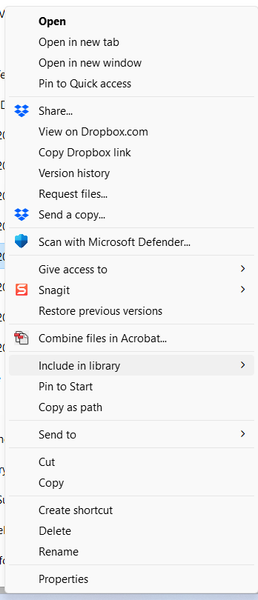
Don't see online only option in the context menu
We have a paid subscription for Dropbox Family, and for any folder (inside or outside the Family Room), do not see an option for either a file or folder to make Online Only. Running Windows 10. Scree...

attafox
2 years agoExplorer | Level 3

Jay Dropbox Community Moderator
2 years agoDropbox Community ModeratorIf you click show more options, do any other Dropbox options appear?
- attafox2 years agoExplorer | Level 3
No. See original screenshot. That hasn't changed.
Since above, I have uninstalled and reinstalled DB. There is now not enough room for me to have a complete set of my files locally (which is why I was trying this as it was), so had to select which folders to only have available online *as I was installing.* It is currently indexing over 300K files (it's down to about 125K at this point), but as of now, is not showing any additional options ... But again, no options to change an existing folder.
Folder selected is one that is now supposedly online only for it's availability.
- Jay2 years ago
Thanks, could you try checking if your Windows preferred language is set to English, to see if this helps?
- attafox2 years agoExplorer | Level 3
It is English. Please escalate this to a Level 2 ... I'm having issues with storage on the hard drive now and really do need to solve this.
About Apps and Installations
Have a question about a Dropbox app or installation? Reach out to the Dropbox Community and get solutions, help, and advice from members.
The Dropbox Community team is active from Monday to Friday. We try to respond to you as soon as we can, usually within 2 hours.
If you need more help you can view your support options (expected response time for an email or ticket is 24 hours), or contact us on X, Facebook or Instagram.
For more info on available support options for your Dropbox plan, see this article.
If you found the answer to your question in this Community thread, please 'like' the post to say thanks and to let us know it was useful!


