We’re Still Here to Help (Even Over the Holidays!) - find out more here.
Forum Discussion

Huxley_D
9 months agoExplorer | Level 4
Dropbox abysmally slow - can't reinstall, can't sync, etc.
Hi all,
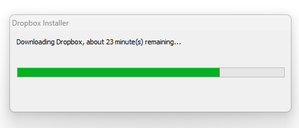
I've recently built a new Windows 11 Pro PC with reasonably high-end specs (AMD 9800X3d CPU, 64GB RAM, 5080 GPU, etc.), and I'm trying to get it all set up the way I like. Everything is wor...

Huxley_D
9 months agoExplorer | Level 4
Update 2: I figured out why the local DropBox app wasn't showing all my stuff: despite carefully clicking "Sync Everything" during install, the not-at-all-obvious "Selective Sync" option to randomly disable a ton of my folders from being synced was automatically enabled. Absolutely bizarre design decision!
Now that I've manually enabled all my folders, the local app does finally show the full 585GB 'weight' of content - now I just need to sync faster than a tortoise on morphine...
- Megan9 months ago
Dropbox Community Moderator
Hey Huxley_D, thanks for posting here!
Apologies for the lengthy reply, I just want to make sure we've covered everything here.
Keep in mind that Dropbox can sync as fast as your Internet service provider (ISP) allows. Consumer ISP's normally provide 1/10th the upload speed compared to download speed.
In your case that you just linked a new computer to your account, the initial sync of your data is going to be the most time and resource intensive period. While we're at it, would you mind hovering your mouse over the little Dropbox icon on your taskbar, next to your WiFi and letting me know the version of our app that you're using?
I just want to make sure that you're not using a Beta version, which might be causing slower syncing speeds.
You may additionally keep in mind that the 300K files limitation, is a soft limit and depends highly on the hardware specifications of the computer running the app, though some users can sync more files without issue.
In that case, if you choose to have all of your 585GB content locally, that might also cause slower syncing time.Lastly, Dropbox doesn't use all of your bandwidth. However, you can change that by manually setting the upload/download speed:
Access the app's preferences, then click the "Bandwidth" tab.
On this tab you will need to either select "Change Settings" or will see the bandwidth settings immediately. Here, you can set the Upload and Download to a specific kB/s limit if you know your connection speed or simply Don't Limit to allow Dropbox to use as much bandwidth as possible.I'll be waiting for your updates!

About Apps and Installations
Have a question about a Dropbox app or installation? Reach out to the Dropbox Community and get solutions, help, and advice from members.
The Dropbox Community team is active from Monday to Friday. We try to respond to you as soon as we can, usually within 2 hours.
If you need more help you can view your support options (expected response time for an email or ticket is 24 hours), or contact us on X, Facebook or Instagram.
For more info on available support options for your Dropbox plan, see this article.
If you found the answer to your question in this Community thread, please 'like' the post to say thanks and to let us know it was useful!


