We’re Still Here to Help (Even Over the Holidays!) - find out more here.
Forum Discussion

Andre F.3
3 years agoExplorer | Level 4
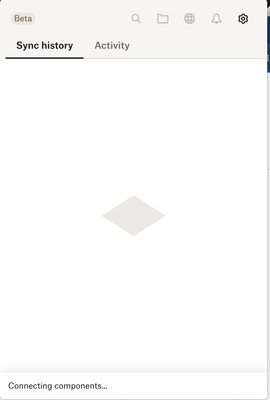
Dropbox app stuck on Connecting Components.
Everytime when dropbox starts the message "connecting components" and it took forever.

laurell
3 years agoExplorer | Level 4
First time this happened. I have Dropbox v182.4.6427, Mac OS Ventura 13.5.2. Restarted computer, closed & reopened app. STUCK!

Remzi
3 years agoNew member | Level 2
I have this same issue - hanging after I "upgraded" to the new file provider thing.
"fileprovider" is running at 100% CPU and Dropbox is "connecting components".
The whole reason to use Dropbox is not to have stuff like this happen. Very frustrating.
(MacOS Ventura 13.4)
- Remzi3 years agoNew member | Level 2
p.s. version 182.4.6427
- CLeDantec3 years agoNew member | Level 2
Very same issue; same dropbox version 182.4.6427 on macOS 13.5.2. Updated to the new file provider version, import seemed to work, then after having sign-out and back (un-related to dropbox), stuck in Connecting components... It's also unclear if it's signed, but selecting 'sign in' from the menu does nothing. It's been running like this for ~5 hours w/o interruption.
Do I just need to blow the install/preferences away and start over?
- Sam DBX3 years ago
Community Manager
Hi all,
Sam from Dropbox Community here 🤚🏽
After discussing this with our team, could you please follow these steps?
1. Delete the current version of the app located in ~/Library/Application Support/Dropbox.
2. Update the app by downloading and installing the latest version from /Applications.
To locate the ~/Library/ folder (which is hidden by default in Finder):
1. Open a Finder window.
2. Select Go from the menu bar at the top of the screen
3. Hold down the Option key to reveal the Library folder option in the dropdown menu
For instructions on updating to the latest version of Dropbox: https://help.dropbox.com/installs/upgrade-latest-version
After the installation:
Confirm that there is no Dropbox.app in ~/Library/Application Support. We suggest doing the ''normal installation'' and checking that no other version appears in ~/Library/Application Support again.Let us know if this resolves this issue.
Thank you.
Sam

About Apps and Installations
Have a question about a Dropbox app or installation? Reach out to the Dropbox Community and get solutions, help, and advice from members.
The Dropbox Community team is active from Monday to Friday. We try to respond to you as soon as we can, usually within 2 hours.
If you need more help you can view your support options (expected response time for an email or ticket is 24 hours), or contact us on X, Facebook or Instagram.
For more info on available support options for your Dropbox plan, see this article.
If you found the answer to your question in this Community thread, please 'like' the post to say thanks and to let us know it was useful!


