We’re Still Here to Help (Even Over the Holidays!) - find out more here.
Forum Discussion

MBeaty
3 years agoNew member | Level 2
Dropbox App Won't Login on Mac. It has me repeating the process.
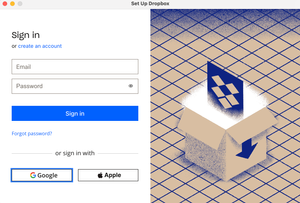
I just got a new Mac and installed the desktop app. When I try to login with Google, the app takes me to my browser to login to Google. Once I login, it takes me right back to the app login screen. I...
- 3 years ago
Hi MBeaty & Twist, happy Monday, let's jump right into this!
It seems you're stuck on this process, where you're asked to log in, and then you're back on the same page.
Is it possible that you're using a Basic plan? And if you are, can you check how many connected devices you have at the moment, and if they are more than 3?
Also, Twist what kind of OS do you use on your end?
Keep me posted!


PeeGeeTips
3 years agoExplorer | Level 3
I've removed a 3rd device but I still can't add the new one, in fact, there's not the same log in option as the OP image displayed above, just says open web browser. I also can't sign in via preferences on the new Mac desktop software either.

Nancy Dropbox Community Moderator
3 years agoDropbox Community ModeratorSorry to hear the same thing happens to you, PeeGeeTips.
Have you tried reinstalling the Dropbox app?
If you have, and you still see the same login prompt, please attach a screenshot of it here (while hiding your personal info).
About Apps and Installations
Have a question about a Dropbox app or installation? Reach out to the Dropbox Community and get solutions, help, and advice from members.
The Dropbox Community team is active from Monday to Friday. We try to respond to you as soon as we can, usually within 2 hours.
If you need more help you can view your support options (expected response time for an email or ticket is 24 hours), or contact us on X, Facebook or Instagram.
For more info on available support options for your Dropbox plan, see this article.
If you found the answer to your question in this Community thread, please 'like' the post to say thanks and to let us know it was useful!


