Your workflow is unique 👨💻 - tell us how you use Dropbox here.
Forum Discussion

jhedleyj
3 years agoHelpful | Level 7
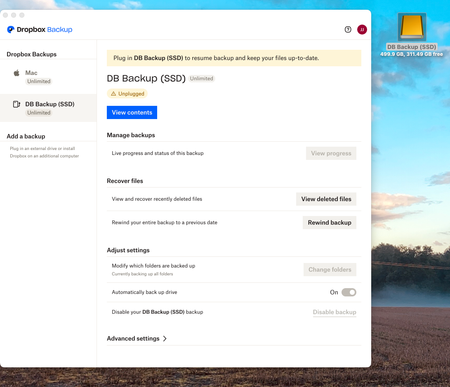
Dropbox Backup shows external drive not plugged in even though it is
I have Dropbox Backup backing up my iMac and have added my external SSD as an additional backup. Everything went well until I restarted the computer and the external disk was then shown as unplugged ...

Jaquie D
2 years agoExplorer | Level 4
I have been experiencing a similar issue with Dropbox Backup on my Mac for the past few days. I thought that restarting might sort this out but it hasn't.

Hannah Dropbox Community Moderator
2 years agoDropbox Community ModeratorHey Jaquie D and anyone else having this issue.
Can you hover over your Dropbox icon and let me know what the sync status of the app is and which version you're currently using?
- Jaquie D2 years agoExplorer | Level 4
Hi Hannah, the sync status says "Up to date" and the version no. is 182.4.6427.
Thanks
- Jaquie D2 years agoExplorer | Level 4
I have done that but Dropbox Backup still says that the drive is unplugged.
- Jay2 years ago
Have you made any other changes to the machine, such as updating the OS, or making any changes to the external drive settings?
- Jaquie D2 years agoExplorer | Level 4
No
- Jay2 years ago
Could you try rebooting the machine, while leaving the external drive connected to the machine, to see if this helps?
- Jaquie D2 years agoExplorer | Level 4
I have tried restarting but Dropbox Backup still says the drive is unplugged.
- Jay2 years ago
Thanks for the info, in order to look into this matter in more detail, would it be possible to reach out to the email associated with your forum profile?
- Jaquie D2 years agoExplorer | Level 4
Yes sure, it's [Removed as per Community Guidelines]
- Jay2 years ago
Thanks, I've sent you an email, please could you reply to it when you get a chance.

About Apps and Installations
Have a question about a Dropbox app or installation? Reach out to the Dropbox Community and get solutions, help, and advice from members.
The Dropbox Community team is active from Monday to Friday. We try to respond to you as soon as we can, usually within 2 hours.
If you need more help you can view your support options (expected response time for an email or ticket is 24 hours), or contact us on X, Facebook or Instagram.
For more info on available support options for your Dropbox plan, see this article.
If you found the answer to your question in this Community thread, please 'like' the post to say thanks and to let us know it was useful!


