Need to see if your shared folder is taking up space on your dropbox 👨💻? Find out how to check here.
Forum Discussion

Davide_Saraceno
3 years agoHelpful | Level 5
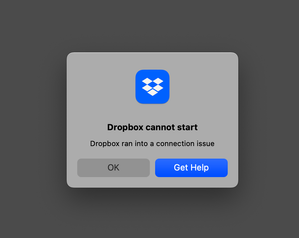
"Dropbox cannot start / Dropbox ran into a connection issue" error (macOS Monterey)
Hi, Dropbox app used to load at startup and work smoothly on my Mac but since a few weeks Dropbox can’t load at startup, giving the following error dialog: "Dropbox cannot start / Dropbox ran into...

Davide_Saraceno
3 years agoHelpful | Level 5
Hi everybody,
I think I’m getting closer to understanding what’s going on.
Since my issue happens at startup I tried removing all the 6 login items opening at login (via System Preferences > Users and Groups > Login Items).
Then I’ve added each one again, one at a time, always restarting my Mac to check the effect.
Well... Dropbox is not able to load at startup when ALSO Apple Mail is among the login items! I guess the “connection timeout error” kicks in because Apple Mail takes a LONG TIME (about 2 mins) to load on my machine — and Dropbox somehow fails connecting to the network. 😞
I’ll try to “optimise" Apple Mail and see if this fixes...
Davide

Jay Dropbox Community Moderator
3 years agoDropbox Community ModeratorHi Davide_Saraceno, thanks for the update, this info might help other users with similar issues!
- Davide_Saraceno3 years agoHelpful | Level 5
Ok, I can confirm that in my case sluggish Apple Mail loading at startup was causing the issue.
I’ve REINDEXED my mailboxes and now Mail it’s slightly faster but - most importantly - Dropbox loads at startup again!
I followed the instructions under "Reindex your Apple Mailbox” from here: https://macpaw.com/how-to/rebuild-mailbox-mac
Hope this helps most of you! 🙂
Davide
 mrumpf3 years agoExplorer | Level 4
I rebuild & reindexed my mailboxes, but that was not related. Even after a fresh reinstall of Dropbox, it reports the error, published above.
- Davide_Saraceno3 years agoHelpful | Level 5
mrumpf maybe in your instance there’s another app bogging your machine at startup? Did you try removing all the "login items" except Dropbox?
Unfortunately today my Apple Mail is slow again when starting up, I guess my mailbox is too large... so I get the “Dropbox cannot start” error dialog again.
But I've found something interesting... if I don’t close this error dialog for long enough (I guess until everything else finished loading) DROPBOX ACTUALLY LOADS!
You guys could try this as well 🙂
 miguel camacho3 years agoExplorer | Level 4
Finally, I found a solution Davide_Saraceno mrumpf
I hope you can read it before they ban my message for criticizing Dropbox support.
After a week of useless "solutions" by email after support issued me a ticket, I had to find a solution myself.
Basically, the problem arises when you update DropBox and the files move to ~Library/CloudStorage.
There was something wrong about that that was cuasing some sort of conflict.
The problem is that Dropbox messes with your hard drive and the permits, and I could not even be able to delete by hand that newly created location.
After the multiple solutions Support offered me (which I already knew and had done like setting full disk access to DropBox or deleting some files) the thing that worked for me was to delete the complete "~Library/CloudStorage" location. I had trouble deleting it since I got the error of not having permissions, probably because Dropbox is running some nasty processes in the back. I had to force empty my Trash by clicking option+empty trash (https://support.apple.com/es-es/guide/mac-help/mchlp1093/mac) After that I did a fresh installation of Dropbox and everything is working perfectly now. I hope they give me a free year after resolving this issue for so many users, the so many hours I have spent on this issue, and a week of not being able to work on my personal computer.
Cheers
 markus_4x43 years agoExplorer | Level 4
I've got the same Dropbox connection issues, but I don't even use Apple Mail, nor I start it at boot up. So maybe it's helping some people, but in my case that is not the issue. My work around for the moment is to go back to the traditional installation with a dropbox folder location outside the "cloud storage" section. Then everything works as usual.
- SS713 years agoExplorer | Level 3
I am having the same issue after installing Ventura version13.5.
Dropbox doesn't start at all.
below is the log file:
bn.BUILD_KEY: Dropbox
bn.VERSION: 174.4.5852
bn.constants.WINDOWS_SHELL_EXT_VERSION: 61
bn.is_frozen: True
machine_id: f9c79adb-9d2a-51c1-a2f9-62de58c5c601
pid: 8536
ppid: 1
uid: 502
user_info: pwd.struct_passwd(pw_name='Suhail', pw_passwd='********', pw_uid=502, pw_gid=20, pw_gecos='Suhail Shaker', pw_dir='/Users/Suhail', pw_shell='/bin/bash')
effective_user_info: pwd.struct_passwd(pw_name='Suhail', pw_passwd='********', pw_uid=502, pw_gid=20, pw_gecos='Suhail Shaker', pw_dir='/Users/Suhail', pw_shell='/bin/bash')
euid: 502
gid: 20
egid: 20
group_info: grp.struct_group(gr_name='staff', gr_passwd='*', gr_gid=20, gr_mem=['root'])
effective_group_info: grp.struct_group(gr_name='staff', gr_passwd='*', gr_gid=20, gr_mem=['root'])
DYLD_LIBRARY_PATH: None
cwd: '/'
real_path='/'
mode=0o40755 uid=0 gid=0
parent mode=0o40755 uid=0 gid=0
HOME: '/Users/Suhail'
appdata: '/Users/Suhail/.dropbox/instance1'
real_path='/Users/Suhail/.dropbox/instance1'
mode=0o40700 uid=502 gid=20
parent mode=0o40700 uid=502 gid=20
dropbox_path: '/Users/Suhail/Library/CloudStorage/Dropbox'
real_path='/Users/Suhail/Library/CloudStorage/Dropbox'
mode=0o40700 uid=502 gid=20
parent mode=0o40755 uid=502 gid=20
sys_executable: '/Applications/Dropbox.app/Contents/MacOS/Dropbox'
real_path='/Applications/Dropbox.app/Contents/MacOS/Dropbox'
mode=0o100755 uid=502 gid=20
parent mode=0o40755 uid=502 gid=20
trace.__file__: '/Applications/Dropbox.app/Contents/Resources/python-packages.zip/dropbox/client/ui/common/boot_error.pyc'
real_path='/Applications/Dropbox.app/Contents/Resources/python-packages.zip/dropbox/client/ui/common/boot_error.pyc'
not found
parent not found
tempdir: '/var/folders/_8/gtwqgsp575j75gcsx5ql0fg80000gp/T'
real_path='/private/var/folders/_8/gtwqgsp575j75gcsx5ql0fg80000gp/T'
mode=0o40700 uid=502 gid=20
parent mode=0o40755 uid=502 gid=20
Traceback (most recent call last):
File "desktop/dropbox/client/main.py", line 828, in wrapper
File "desktop/dropbox/client/main.py", line 6444, in finish_dropbox_boot
File "desktop/dropbox/client/message_queue.py", line 306, in _wrapped
File "desktop/dropbox/client/main.py", line 5986, in _init_components_for_account
File "desktop/dropbox/client/main.py", line 5910, in create_sync_engine
File "desktop/dropbox/sync_engine_boundary/factory.py", line 225, in make_sync_engine
File "desktop/dropbox/sync_engine/nucleus/classic_client/sync_engine.py", line 243, in __init__
File "desktop/dropbox/sync_engine/nucleus/classic_client/modern_client/modern_client.py", line 324, in __init__
File "desktop/dropbox/client/gandalf/legacy.py", line 296, in add_on_changed_callback
File "desktop/dropbox/sync_engine/nucleus/classic_client/modern_client/modern_client.py", line 487, in _update_feature_configs
File "desktop/dropbox/sync_engine/nucleus/classic_client/modern_client/modern_thin_client.py", line 286, in UpdateFeatureConfigForFswRules
File "desktop/dropbox/sync_engine/nucleus/thin_client/fp_client.py", line 236, in __getattr__
dropbox.sync_engine.nucleus.thin_client.exceptions.NucleusConnectionTimeoutError: Nucleus clients are not running. Connection error: Error Domain=com.dropbox.fileprovider.error Code=5 "(null)" UserInfo={NSUnderlyingError=0x600003d3b8a0 {Error Domain=NSCocoaErrorDomain Code=4099 "Error while sending fetchServicesForItemID:allowRestrictedSources:completionHandler:" UserInfo={NSDebugDescription=Error while sending fetchServicesForItemID:allowRestrictedSources:completionHandler:, NSUnderlyingError=0x600003d3a1f0 {Error Domain=NSCocoaErrorDomain Code=4099 "The connection from pid 8654 on anonymousListener or serviceListener was invalidated from this process." UserInfo={NSDebugDescription=The connection from pid 8654 on anonymousListener or serviceListener was invalidated from this process.}}}}}
About Apps and Installations
Have a question about a Dropbox app or installation? Reach out to the Dropbox Community and get solutions, help, and advice from members.
The Dropbox Community team is active from Monday to Friday. We try to respond to you as soon as we can, usually within 2 hours.
If you need more help you can view your support options (expected response time for an email or ticket is 24 hours), or contact us on X, Facebook or Instagram.
For more info on available support options for your Dropbox plan, see this article.
If you found the answer to your question in this Community thread, please 'like' the post to say thanks and to let us know it was useful!


