Need to see if your shared folder is taking up space on your dropbox 👨💻? Find out how to check here.
Forum Discussion

Davide_Saraceno
3 years agoHelpful | Level 5
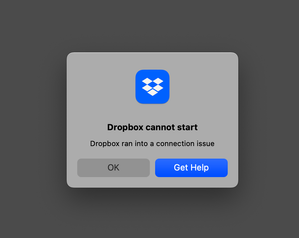
"Dropbox cannot start / Dropbox ran into a connection issue" error (macOS Monterey)
Hi, Dropbox app used to load at startup and work smoothly on my Mac but since a few weeks Dropbox can’t load at startup, giving the following error dialog: "Dropbox cannot start / Dropbox ran into...

PG23
3 years agoExplorer | Level 3
For some reason it all seems to be working fine, so you can ignore my request. Thank you for the support. Peter

Jay Dropbox Community Moderator
3 years agoDropbox Community ModeratorThe logs are safe to post on the site, please feel free to do so.
 superudi3 years agoExplorer | Level 4
bn.BUILD_KEY: Dropbox
bn.VERSION: 170.3.5866
bn.constants.WINDOWS_SHELL_EXT_VERSION: 61
bn.is_frozen: True
machine_id: 2ba58c91-9ffd-5995-9a85-2f71172cabe2
pid: 3748
ppid: 1
uid: 501
user_info: pwd.struct_passwd(pw_name='udi', pw_passwd='********', pw_uid=501, pw_gid=20, pw_gecos='Udi Avital', pw_dir='/Users/udi', pw_shell='/bin/bash')
effective_user_info: pwd.struct_passwd(pw_name='udi', pw_passwd='********', pw_uid=501, pw_gid=20, pw_gecos='Udi Avital', pw_dir='/Users/udi', pw_shell='/bin/bash')
euid: 501
gid: 20
egid: 20
group_info: grp.struct_group(gr_name='staff', gr_passwd='*', gr_gid=20, gr_mem=['root', '_serialnumberd'])
effective_group_info: grp.struct_group(gr_name='staff', gr_passwd='*', gr_gid=20, gr_mem=['root', '_serialnumberd'])
DYLD_LIBRARY_PATH: None
cwd: '/'
real_path='/'
mode=0o40755 uid=0 gid=0
parent mode=0o40755 uid=0 gid=0
HOME: '/Users/udi'
appdata: '/Users/udi/.dropbox/instance1'
real_path='/Users/udi/.dropbox/instance1'
mode=0o40700 uid=501 gid=20
parent mode=0o40700 uid=501 gid=20
dropbox_path: '/Users/udi/Library/CloudStorage/Dropbox'
real_path='/Users/udi/Library/CloudStorage/Dropbox'
mode=0o40700 uid=501 gid=20
parent mode=0o40755 uid=501 gid=20
sys_executable: '/Applications/Dropbox.app/Contents/MacOS/Dropbox'
real_path='/Applications/Dropbox.app/Contents/MacOS/Dropbox'
mode=0o100755 uid=501 gid=20
parent mode=0o40755 uid=501 gid=20
trace.__file__: '/Applications/Dropbox.app/Contents/Resources/python-packages.zip/dropbox/client/ui/common/boot_error.pyc'
real_path='/Applications/Dropbox.app/Contents/Resources/python-packages.zip/dropbox/client/ui/common/boot_error.pyc'
not found
parent not found
tempdir: '/var/folders/hj/yp7t33cs46351dxh18sgcpcr0000gn/T'
real_path='/private/var/folders/hj/yp7t33cs46351dxh18sgcpcr0000gn/T'
mode=0o40700 uid=501 gid=20
parent mode=0o40755 uid=501 gid=20
Traceback (most recent call last):
File "dropbox/client/main.pyc", line 820, in wrapper
File "dropbox/client/main.pyc", line 6323, in finish_dropbox_boot
File "dropbox/client/message_queue.pyc", line 306, in _wrapped
File "dropbox/client/main.pyc", line 5865, in _init_components_for_account
File "dropbox/client/main.pyc", line 5789, in create_sync_engine
File "dropbox/sync_engine_boundary/factory.pyc", line 225, in make_sync_engine
File "dropbox/sync_engine/nucleus/classic_client/sync_engine.pyc", line 243, in __init__
File "dropbox/sync_engine/nucleus/classic_client/modern_client/modern_client.pyc", line 324, in __init__
File "dropbox/client/gandalf/legacy.pyc", line 296, in add_on_changed_callback
File "dropbox/sync_engine/nucleus/classic_client/modern_client/modern_client.pyc", line 487, in _update_feature_configs
File "dropbox/sync_engine/nucleus/classic_client/modern_client/modern_thin_client.pyc", line 286, in UpdateFeatureConfigForFswRules
File "dropbox/sync_engine/nucleus/thin_client/fp_client.pyc", line 236, in __getattr__
dropbox.sync_engine.nucleus.thin_client.exceptions.NucleusConnectionTimeoutError: Nucleus clients are not running. Connection error: Error Domain=com.dropbox.fileprovider.error Code=5 "(null)" UserInfo={NSUnderlyingError=0x6000031c0b70 {Error Domain=NSCocoaErrorDomain Code=4097 "Error while sending fetchServicesForItemID:completionHandler:" UserInfo={NSDebugDescription=Error while sending fetchServicesForItemID:completionHandler:, NSUnderlyingError=0x6000031c1ce0 {Error Domain=NSCocoaErrorDomain Code=4097 "connection from pid 3898 on anonymousListener or serviceListener" UserInfo={NSDebugDescription=connection from pid 3898 on anonymousListener or serviceListener}}}}}- Emmet3 years ago
Community Manager
Hi superudi,
Thank you for bringing this to our attention. The error you’re encountering is temporary and should be fixed by restarting the Dropbox desktop app. Our engineers are aware of the problem and are working to resolve it as soon as possible.If the issue persists following the restart, please let us know and we can investigate further.Regards,Emmet  andydp3 years agoExplorer | Level 3
mine doesn't start neither (reboot or restarting dropbox doesn't help)
OS: MacOS Ventura 13.3.1
bn.BUILD_KEY: Dropboxbn.VERSION: 173.2.3030bn.constants.WINDOWS_SHELL_EXT_VERSION: 61bn.is_frozen: Truemachine_id: f6df1b1c-8aca-5cad-b4f7-833809dd8382pid: 44795ppid: 1uid: 501user_info: pwd.struct_passwd(pw_name='adepetter', pw_passwd='********', pw_uid=501, pw_gid=20, pw_gecos='Andy De Petter', pw_dir='/Users/adepetter', pw_shell='/bin/zsh')effective_user_info: pwd.struct_passwd(pw_name='adepetter', pw_passwd='********', pw_uid=501, pw_gid=20, pw_gecos='Andy De Petter', pw_dir='/Users/adepetter', pw_shell='/bin/zsh')euid: 501gid: 20egid: 20group_info: grp.struct_group(gr_name='staff', gr_passwd='*', gr_gid=20, gr_mem=['root', 'adepetter', '_avectodaemon', '_cyberarkepm', '_defendpoint'])effective_group_info: grp.struct_group(gr_name='staff', gr_passwd='*', gr_gid=20, gr_mem=['root', 'adepetter', '_avectodaemon', '_cyberarkepm', '_defendpoint'])DYLD_LIBRARY_PATH: Nonecwd: '/'real_path='/'mode=0o40755 uid=0 gid=0parent mode=0o40755 uid=0 gid=0HOME: '/Users/adepetter'appdata: '/Users/adepetter/.dropbox/instance1'real_path='/Users/adepetter/.dropbox/instance1'mode=0o40700 uid=501 gid=20parent mode=0o40755 uid=501 gid=20dropbox_path: '/Users/adepetter/Library/CloudStorage/Dropbox'real_path='/Users/adepetter/Library/CloudStorage/Dropbox'mode=0o40700 uid=501 gid=20parent mode=0o40755 uid=501 gid=20sys_executable: '/Users/adepetter/Library/Application Support/Dropbox/Dropbox.app/Contents/MacOS/Dropbox'real_path='/Users/adepetter/Library/Application Support/Dropbox/Dropbox.app/Contents/MacOS/Dropbox'mode=0o100755 uid=501 gid=20parent mode=0o40755 uid=501 gid=20trace.__file__: '/Users/adepetter/Library/Application Support/Dropbox/Dropbox.app/Contents/Resources/python-packages.zip/dropbox/client/ui/common/boot_error.pyc'real_path='/Users/adepetter/Library/Application Support/Dropbox/Dropbox.app/Contents/Resources/python-packages.zip/dropbox/client/ui/common/boot_error.pyc'not foundparent not foundtempdir: '/var/folders/4_/3pvq_rjs7ns4s_7w01lygcx80000gn/T'real_path='/private/var/folders/4_/3pvq_rjs7ns4s_7w01lygcx80000gn/T'mode=0o40700 uid=501 gid=20parent mode=0o40755 uid=501 gid=20Traceback (most recent call last):File "dropbox/client/main.pyc", line 824, in wrapperFile "dropbox/client/main.pyc", line 6358, in finish_dropbox_bootFile "dropbox/client/message_queue.pyc", line 306, in _wrappedFile "dropbox/client/main.pyc", line 5900, in _init_components_for_accountFile "dropbox/client/main.pyc", line 5824, in create_sync_engineFile "dropbox/sync_engine_boundary/factory.pyc", line 225, in make_sync_engineFile "dropbox/sync_engine/nucleus/classic_client/sync_engine.pyc", line 243, in __init__File "dropbox/sync_engine/nucleus/classic_client/modern_client/modern_client.pyc", line 324, in __init__File "dropbox/client/gandalf/legacy.pyc", line 296, in add_on_changed_callbackFile "dropbox/sync_engine/nucleus/classic_client/modern_client/modern_client.pyc", line 487, in _update_feature_configsFile "dropbox/sync_engine/nucleus/classic_client/modern_client/modern_thin_client.pyc", line 286, in UpdateFeatureConfigForFswRulesFile "dropbox/sync_engine/nucleus/thin_client/fp_client.pyc", line 236, in __getattr__dropbox.sync_engine.nucleus.thin_client.exceptions.NucleusConnectionTimeoutError: Nucleus clients are not running. Connection error: Error Domain=com.dropbox.fileprovider.error Code=5 "(null)" UserInfo={NSUnderlyingError=0x600002513510 {Error Domain=NSFileProviderInternalErrorDomain Code=12 "(null)"}}- Hannah3 years ago
Hey andydp, thanks for bringing this to our attention.
Is it possible that you might have any security apps installed on your computer, like a VPN, antivirus, firewall etc. that might be blocking the Dropbox app?
If you do, can you disable them temporarily, to see if that helps?
- andydp3 years agoExplorer | Level 3
no joy
when I disable my antivirus, it does start but:
- it claims it can't sync (icon with cross in task bar on Mac)
- it does sync 🙂
and quite some dropbox processes running:
/Applications/Dropbox.app/Contents/PlugIns/DropboxFileProvider.appex/Contents/MacOS/DropboxFileProvider -AppleLanguages ("en-BE")/Users/adepetter/Library/Application Support/Dropbox/Dropbox.app/Contents/MacOS/Dropbox /newerversion/Users/adepetter/Library/Application Support/Dropbox/Dropbox.app/Contents/Frameworks/Dropbox Helper (Renderer).app/Contents/MacOS/Dropbox Helper (Renderer)/Applications/Dropbox.app/Contents/PlugIns/DropboxFileProvider.appex/Contents/MacOS/DropboxFileProviderCH/Users/adepetter/Library/Application Support/Dropbox/Dropbox.app/Contents/Frameworks/Dropbox Helper (Renderer).app/Contents/MacOS/Dropbox Helper (Renderer)/Users/adepetter/Library/Application Support/Dropbox/Dropbox.app/Contents/Frameworks/Dropbox Helper (Renderer).app/Contents/MacOS/Dropbox Helper (Renderer)/Users/adepetter/Library/Application Support/Dropbox/Dropbox.app/Contents/Frameworks/Dropbox Helper.app/Contents/MacOS/Dropbox Helper/Users/adepetter/Library/Application Support/Dropbox/Dropbox.app/Contents/Frameworks/Dropbox Helper (GPU).app/Contents/MacOS/Dropbox Helper (GPU)/Users/adepetter/Library/Application Support/Dropbox/Dropbox.app/Contents/MacOS/Dropbox/Users/adepetter/Library/Application Support/Dropbox/Dropbox.app/Contents/XPCServices/DropboxActivityProvider.xpc/Contents/MacOS/DropboxActivityProvider - andydp3 years agoExplorer | Level 3
looks like that did the trick 🙂
thx
- superudi3 years agoExplorer | Level 4
Hi Emmet
I tried everything – reinstalling the app, restart, system update – nothing solves the problem.
I don't have access to my personal Dropbox for more than two months now from my Macbook.
Please help.
- superudi3 years agoExplorer | Level 4
Yes I would love that. Do you need my email address? I guess you already have it
 Bud S.13 years agoExplorer | Level 4
Reinstalling Dropbox using the link also worked for me.


About Apps and Installations
Have a question about a Dropbox app or installation? Reach out to the Dropbox Community and get solutions, help, and advice from members.
The Dropbox Community team is active from Monday to Friday. We try to respond to you as soon as we can, usually within 2 hours.
If you need more help you can view your support options (expected response time for an email or ticket is 24 hours), or contact us on X, Facebook or Instagram.
For more info on available support options for your Dropbox plan, see this article.
If you found the answer to your question in this Community thread, please 'like' the post to say thanks and to let us know it was useful!


