We’re Still Here to Help (Even Over the Holidays!) - find out more here.
Forum Discussion

immerge consul jinks tribade
2 years agoNew member | Level 2
Dropbox demands reinstalling after it's installed in Windows. I haven't installed with admin rights.
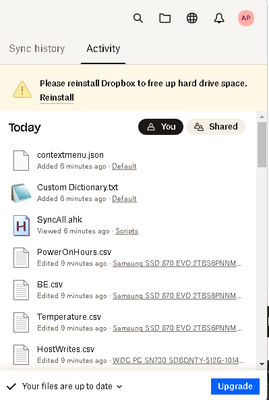
So I just reinstalled the desktop app, but when I open the window using tray icon it shows me this message.
And it demands reinstalling with admin privileges, which I will avoid (including swit...

immerge consul jinks tribade
2 years agoNew member | Level 2
and if I decline, I get the following:
- Megan2 years ago
Dropbox Community Moderator
Hey from here too immerge consul jinks tribade!
I did end up separating the threads, since they were merged.
As I mentioned in the original thread before: In general, the Dropbox desktop application does require admin privileges to be installed on a machine, and this would also include any new updates for the app itself for it to function properly.
You mentioned that your app doesn't run with admin privileges at the moment, right?

About Apps and Installations
Have a question about a Dropbox app or installation? Reach out to the Dropbox Community and get solutions, help, and advice from members.
The Dropbox Community team is active from Monday to Friday. We try to respond to you as soon as we can, usually within 2 hours.
If you need more help you can view your support options (expected response time for an email or ticket is 24 hours), or contact us on X, Facebook or Instagram.
For more info on available support options for your Dropbox plan, see this article.
If you found the answer to your question in this Community thread, please 'like' the post to say thanks and to let us know it was useful!


