We're making some changes to the Dropbox Community 👩💻 - Find out more here.
Forum Discussion

Sir_Caramel
1 year agoHelpful | Level 7
Dropbox desktop app won't install on Windows 11 and gives me an error
Hi there, Dropbox does not complete installation on a new Win 11 install that has been fully updated.
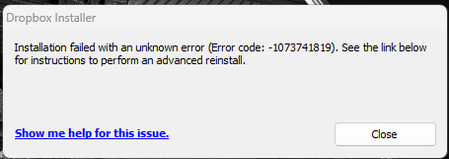
This is the latest error code:
I've tried different things for 2-3 days no and nothing h...
 11 months ago
After a few weeks of trying to isolate the problem, it seems that the issue was with Astrill VPN setting up a .dll file that messed things up. Since I needed Astrill on to get Dropbox to work due to local issues, then it wasn't easy to isolate the problem.
I think, though, with the '5 eyes' privacy issues and the political issues currently exacerbating over the Atlantic, it's time for me to switch to European-based companies and servers. Thank you, Dropbox. It's been a good run.

Walter Dropbox Community Moderator
1 year agoDropbox Community ModeratorHi Sir_Caramel - sorry to hear you're having issues with this.
Have you tried clicking on the "Show me help for this issue." option at all?
Since you've already done some troubleshooting and still get an error when trying to install the Dropbox desktop app on your Windows computer, could you try an advanced reinstall and let us know how it goes?
Thanks so much!
PS: I'd also make sure that there's no antivirus, firewall and/or VPN/proxy setting that could be causing issues.
- Sir_Caramel1 year agoHelpful | Level 7
Hello Walter, I've just tried the advanced reinstall, cleared everything out and edited registry with regedit. Reinstalled and same error code.
- Walter1 year ago
And where does the blue hyperlink lead you when you click on it Sir_Caramel?
If you're on the Basic plan, have you ensured that you're not connecting more than 3 devices to your account as you might be hitting your device limit?
- Sir_Caramel1 year agoHelpful | Level 7
Hi,
The link takes me to this page:
Interestingly, after trying 3 more installs, it eventually managed to install without an error message, without any confirmation in fact. When I tried to open Dropbox.exe, nothing happened, even running as admin.
I deleted the install and tried installing again, getting the same error code as before.
I had dropbox on two devices. Deleted one of them, so now Dropbox is only on 1 device.
About Apps and Installations
Have a question about a Dropbox app or installation? Reach out to the Dropbox Community and get solutions, help, and advice from members.
The Dropbox Community team is active from Monday to Friday. We try to respond to you as soon as we can, usually within 2 hours.
If you need more help you can view your support options (expected response time for an email or ticket is 24 hours), or contact us on X, Facebook or Instagram.
For more info on available support options for your Dropbox plan, see this article.
If you found the answer to your question in this Community thread, please 'like' the post to say thanks and to let us know it was useful!


