Our Community is in read-only mode until April 8th, learn more here. You can still search existing threads or get help via Dropbox Support, the Dropbox Help Center, or Learn.
Forum Discussion

intelcorei7gaming
2 years agoExplorer | Level 3
Dropbox driver not signed on windows 7
Hello,
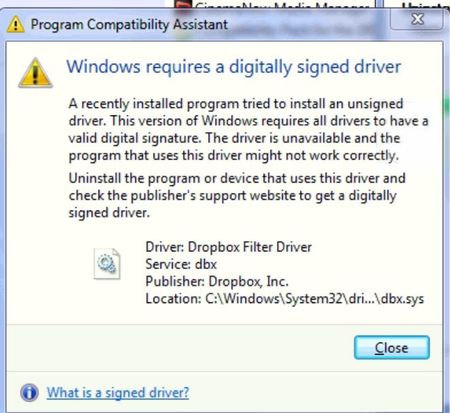
when I try to sign into Dropbox on windows 7 I get driver error
can someone help me with this? thanks!
- 2 years ago
Hello,
There is no issue with the Dropbox digital signature. That Windows warning message appears when trying to load drivers signed with a SHA-2 signature on older versions of Windows which only support SHA-1 signatures. Microsoft deprecated SHA-1 signatures in 2019. During the transition period from SHA-1 to SHA-2 Dropbox used to sign their driver with both SHA-1 and SHA-2 signatures, but now only sign with SHA-2.
The good news is support for SHA-2 signatures can be added to Windows 7 SP1 by installing KB3033929. Doing that should fix the issue.
Hope this helps,
Andrew (DBoxTips)


Nancy Dropbox Community Moderator
2 years agoDropbox Community ModeratorHi from me as well, dbForumUser!
Just to clarify, does this message pop up every time you access your computer, or was it a one-time thing?

dbForumUser
2 years agoExplorer | Level 3
one-time so far. If my sleuthing is correct, it happened when Avast was updating itself.
Does the digital signature look correct?
- Jay2 years ago
Hi dbForumUser, there doesn't appear to be any obvious issues with the digital signature.
If you experience this issue again in the future, please contact the support team directly for them to investigate this in more detail.

About Apps and Installations
Have a question about a Dropbox app or installation? Reach out to the Dropbox Community and get solutions, help, and advice from members.
The Dropbox Community team is active from Monday to Friday. We try to respond to you as soon as we can, usually within 2 hours.
If you need more help you can view your support options (expected response time for an email or ticket is 24 hours), or contact us on X, Facebook or Instagram.
For more info on available support options for your Dropbox plan, see this article.
If you found the answer to your question in this Community thread, please 'like' the post to say thanks and to let us know it was useful!


