Your workflow is unique 👨💻 - tell us how you use Dropbox here.
Forum Discussion

Naima-Dragon
2 years agoExplorer | Level 4
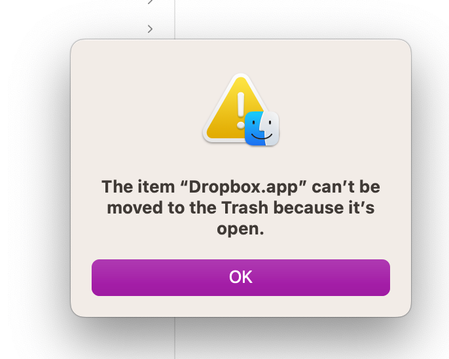
My Dropbox icon missing from the menu bar, and I can't uninstall the app on my Mac.
Hi community,
All of the sudden, the dropbox icon has disappeared from my mac menu bar. It happened a few weeks ago, but I see that everything would synch up by seeing the green check mark appear. ...
 2 years ago
This was solved by customer support. Thanks!
The solution was to uninstall dropbox and redownload it.
John

Jay Dropbox Community Moderator
2 years agoDropbox Community ModeratorHi Naima-Dragon, thanks for bringing this to our attention.
Could you try quitting the app from the 'Force quit' menu in Mac OS, and then uninstall the app?
Keep me updated with any progress!

Naima-Dragon
2 years agoExplorer | Level 4
Thanks for your reply. But I don't understand what you mean. What are you referring to when you say "force quit" the "app". Can you share some screenshots of what you mean? I access my dropbox from Finder. I don't have an app open .
- Megan2 years ago
Hi Naima-Dragon, sorry to jump in here!
In order to fix this, would you mind opening the 'Activity Monitor' utility on your computer, normally located under Applications > Utilities, to see if there are any other processes associated with Dropbox that may be preventing the app from being removed from your device?
Once you have launched 'Activity Monitor', if you see any items that refer to Dropbox, please click on the line that references the process to select it and then click on the 'X' at the top left corner of the screen.
After you've done so, please try to follow the normal uninstall instructions.
 SL0012 years agoExplorer | Level 4
I have the same problem (icon is missing from Mac menu bar). Actually it intermittently appears (though rarely), but has been missing more 90% of the time last few months. I forced quit through Activity monitor (as otherwise couldn't delete because of "open" error message previously referred to). I then deleted the app (from Finder> Applications), and re-installed. But still no Dropbox icon in menu bar!


About Apps and Installations
Have a question about a Dropbox app or installation? Reach out to the Dropbox Community and get solutions, help, and advice from members.
The Dropbox Community team is active from Monday to Friday. We try to respond to you as soon as we can, usually within 2 hours.
If you need more help you can view your support options (expected response time for an email or ticket is 24 hours), or contact us on X, Facebook or Instagram.
For more info on available support options for your Dropbox plan, see this article.
If you found the answer to your question in this Community thread, please 'like' the post to say thanks and to let us know it was useful!


