Your workflow is unique 👨💻 - tell us how you use Dropbox here.
Forum Discussion

Frpx
1 year agoExplorer | Level 4
Dropbox Installer remove Windows Defender Firewall rule
I'm using Windows Defender Firewall and it blocks sends that don't match the rules. I created a rule to allow the Dropbox process, but every time I update Dropbox this rule is removed. If this rule...

Frpx
1 year agoExplorer | Level 4
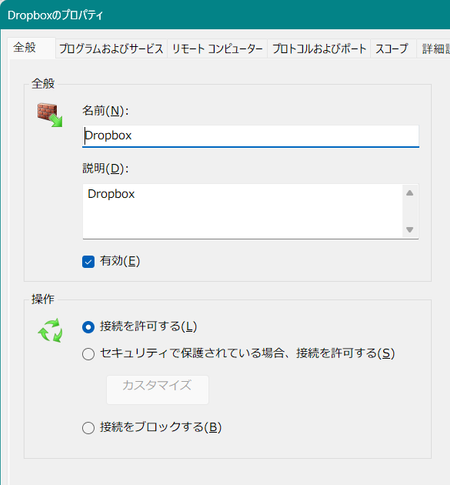
Hi @Jay, Reproduce with these steps.
1) There is a rule called "Dropbox" in the outbound of Windows Defender Firewall.
2) The rule allows the process 'C:\Program Files (x86)\Dropbox\Client\Dropbox.exe'.
3) Install/Update the Dropbox desktop application with administrator privileges.
The rule will be removed with these steps.
Windows 11 23H2
DropboxClient_197.4.7571.x64.exe
Thank you.

Jay Dropbox Community Moderator
1 year agoDropbox Community ModeratorThanks for the feedback on this matter.
We appreciate your comments and will take them into consideration when improving the Dropbox app and services.
About Apps and Installations
Have a question about a Dropbox app or installation? Reach out to the Dropbox Community and get solutions, help, and advice from members.
The Dropbox Community team is active from Monday to Friday. We try to respond to you as soon as we can, usually within 2 hours.
If you need more help you can view your support options (expected response time for an email or ticket is 24 hours), or contact us on X, Facebook or Instagram.
For more info on available support options for your Dropbox plan, see this article.
If you found the answer to your question in this Community thread, please 'like' the post to say thanks and to let us know it was useful!


