Your workflow is unique 👨💻 - tell us how you use Dropbox here.
Forum Discussion

mt33
1 year agoNew member | Level 1
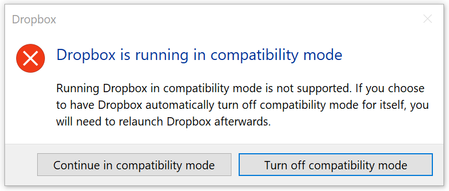
Dropbox running on compatibility mode gives me an error.
This error started popping up couple of days ago whenever I opened my laptop.
Dropbox isn't syncing.
Have searched previous communications and tried several solutions: advanced uninstall, firew...

mitgeek
1 year agoNew member | Level 2
I'm having same issue on my Win 11 machine. I've been in contact with Drop Box support as I pay for the Drop Box Plus version. But we have not been able to solve this. The only clue I have is that installing older offline versions like 210. or 211. seem to work for a minute or two until the silly app auto updates itself then it stops working. I do have to enable Compatility Mode for Win 7 to allow this to work for a few minutes, but then it updates then exits. Super frustrating!
About Apps and Installations
Have a question about a Dropbox app or installation? Reach out to the Dropbox Community and get solutions, help, and advice from members.
The Dropbox Community team is active from Monday to Friday. We try to respond to you as soon as we can, usually within 2 hours.
If you need more help you can view your support options (expected response time for an email or ticket is 24 hours), or contact us on X, Facebook or Instagram.
For more info on available support options for your Dropbox plan, see this article.
If you found the answer to your question in this Community thread, please 'like' the post to say thanks and to let us know it was useful!


