Your workflow is unique 👨💻 - tell us how you use Dropbox here.
Forum Discussion

Sydenham
2 years agoExplorer | Level 3
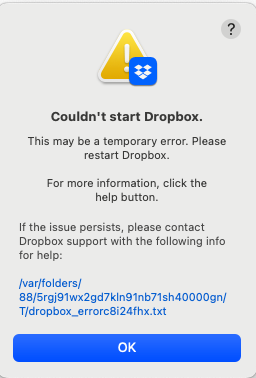
Dropbox won't open as I'm getting an error
I found that my personal files were ending up in a shared file (with an organisation I am part of). I have moved files elsewhere for now. Then I uninstalled Dropbox when I try to reinstall I keep ge...
 2 years ago
the terminal does not show the password. The cursor on screen will not move, this is the correct behaviour. Just enter your password and press enter and then add the next line by copy/pasting and pressing enter again. Do this until you are finished with all the lines. After having pressed enter after the last line, reinstall the app.

Megan Dropbox Community Moderator
2 years agoDropbox Community ModeratorHi Ricky sas, can you also confirm the OS on the device that's facing this error?

Ricky sas
2 years agoExplorer | Level 3
It is MacBook Pro Retina mid 15
macOS Monterrey 12.6.7
- Walter2 years ago
Hey Ricky sas, would it be OK if we reached out via email to have a further look internally at this point?
- Ricky sas2 years agoExplorer | Level 3
Ok
My email
[removed per the Community's Guidelines]Please contact me ! Is urgent!
Thank you

About Apps and Installations
Have a question about a Dropbox app or installation? Reach out to the Dropbox Community and get solutions, help, and advice from members.
The Dropbox Community team is active from Monday to Friday. We try to respond to you as soon as we can, usually within 2 hours.
If you need more help you can view your support options (expected response time for an email or ticket is 24 hours), or contact us on X, Facebook or Instagram.
For more info on available support options for your Dropbox plan, see this article.
If you found the answer to your question in this Community thread, please 'like' the post to say thanks and to let us know it was useful!


