Your workflow is unique 👨💻 - tell us how you use Dropbox here.
Forum Discussion

edw00d
6 years agoNew member | Level 2
Getting strange icons in Windows Explorer
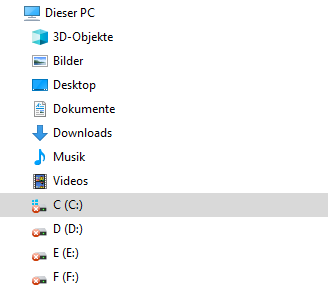
Since the Windows July Update yesterday i get strange icons in my Windows Explorer. (Drive letter with little red X) When i close the Dropbox Service they are gone. Dropbox Version 77.3.125 Window...
- 6 years ago
Hey there edw00d - sorry to hear (and see) that!
As I can see that you're on the beta build of our desktop app and these are still in the testing process, you could experience some issues or an inconsistent experience.
As a first step to isolate this -admittedly weird- issue, I would highly recommend that you install our latest stable version of the Dropbox desktop application.
To do this, you will first need to follow these steps to verify that you have opted out of "Include me in early releases" option in your settings on Dropbox.com. This will ensure that the application does not automatically update to the beta build after you install the latest stable build:
- Log in to www.Dropbox.com using your web browser.
- Click on you account picture/avatar at the top right corner of the page.
- Click on "Settings".
- From the "General" tab, scroll down to the section titled "Preferences" and uncheck the box next to "Include me in early releases" if it is checked.
Then, use the following link to install the latest stable version of the Dropbox desktop application: https://www.dropbox.com/downloading?build=76.4.126&plat=win&type=full
Let me know the results when you get the chance please!
Kanario
6 years agoHelpful | Level 5
Hi,
Today when I turned on my pc and opened System, every icon in there showed a small red circle with a white "x" inside of it (see capture) but, on the other hand, I could open all them and have access to the files as usual before this happened (Discs C: E: and F:, and the DVD RW unit).
I spent a couple of hours in Google trying to investigate it but found just something similar concerning to OneDrive cloud.
What did I do? I opened the Task Manager, and in Processes tab, I did right click on "Dropbox.exe" and selected "Finish proccess".
So soon as I did it, opened again System, and all these "x" symbols disspeared from the icons.
After this, I launched Dropbox, and when it was ready, I refreshed System folder (F5) and every icon showed again the same white "x" into a red circle. Again stopped Dropbox through TaskAdmin, refreshed System folder and that "x" dissapeared again after refreshing, so I think it could have some kind of relation with that symbol in the icons.
Then I downloaded DroppboxInstaller.exe and executed it, and the issue reproduced again.
Do you know if there is any solution, or should I uninstall and reinstall Dropbox? Thank you.
PD: windows 7 professional Service Pack1

Walter Dropbox Community Moderator
6 years agoDropbox Community ModeratorHey there Kanario - sorry to hear about this.
As some other users reported this too, I went ahead and merged your post into this thread so as to ping you with my suggestion (i.e. downgrade from the beta build and install our latest stable version of the desktop app).
Can you take a look and let me know if it worked for you as well?
Thanks in advance and sorry for the late response - your post had been caught by our Community's spam filters (probably due to its length) and I just got the chance to get to it.
About Apps and Installations
Have a question about a Dropbox app or installation? Reach out to the Dropbox Community and get solutions, help, and advice from members.
The Dropbox Community team is active from Monday to Friday. We try to respond to you as soon as we can, usually within 2 hours.
If you need more help you can view your support options (expected response time for an email or ticket is 24 hours), or contact us on X, Facebook or Instagram.
For more info on available support options for your Dropbox plan, see this article.
If you found the answer to your question in this Community thread, please 'like' the post to say thanks and to let us know it was useful!


