Your workflow is unique 👨💻 - tell us how you use Dropbox here.
Forum Discussion

AutobotsKicksAft
6 months agoExplorer | Level 3
How can I make all my Dropbox files available offline, without manually clicking on all of them?
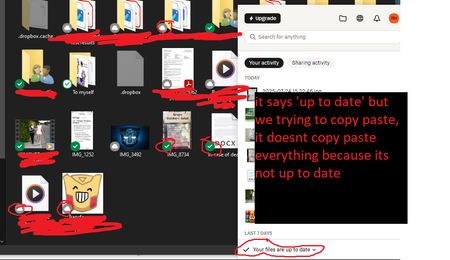
i want to get stuff out of DB yet it wont sync. it has a cloud icon. i manually have to click things to make it a check mark. DB was saying 'make available offline' and i did yet it still wont work. ...

Mark Super User II
6 months agoSuper User IIThanks for the images, they help.
Dropbox is up to date because you can see the files on the device. The issue is they are not downloaded locally. Dropbox doesnt download everything locally to save disk space. You can use https://help.dropbox.com/sync/access-files-offline to alter this BUT it doesnt always apply to new files to save on Hard Drive space.

AutobotsKicksAft
6 months agoExplorer | Level 3
Ok thank you I will try that later
- Walter6 months ago
Dropbox Community Moderator
Let us know of anything else comes up in the meantime AutobotsKicksAft
- Nancy5 months ago
Hey AutobotsKicksAft! I hope that the suggestion of our Super Users helped you in the end.
If you need something else though, feel free to give me a nudge.


About Apps and Installations
Have a question about a Dropbox app or installation? Reach out to the Dropbox Community and get solutions, help, and advice from members.
The Dropbox Community team is active from Monday to Friday. We try to respond to you as soon as we can, usually within 2 hours.
If you need more help you can view your support options (expected response time for an email or ticket is 24 hours), or contact us on X, Facebook or Instagram.
For more info on available support options for your Dropbox plan, see this article.
If you found the answer to your question in this Community thread, please 'like' the post to say thanks and to let us know it was useful!


