Your workflow is unique 👨💻 - tell us how you use Dropbox here.
Forum Discussion

devedsmith
19 days agoHelpful | Level 6
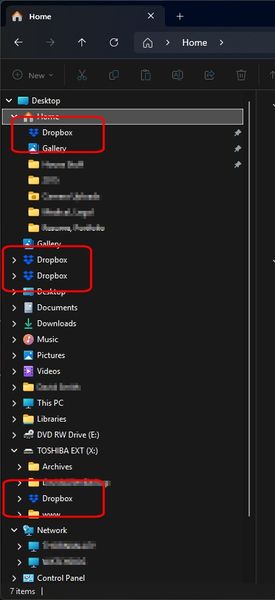
How do I get rid of Dropbox showing in multiple places in Windows Explorer?
Device Dell Alienware 17 Operating System/Browser (if using the web) Windows 11 Pro Dropbox App Version (if using the app) 241.4.4853 Dropbox Plan Plus Question or Issue How do I get rid of ...

devedsmith
19 days agoHelpful | Level 6
Interesting idea. The one that was pinned I never actually pinned there so I unpinned it. The others are not pinned and there is nothing in the context menu that allows me to remove them other than "Delete" - which is alarming.
- Nancy19 days ago
Dropbox Community Moderator
devedsmith, out of curiosity, do all of these shortcuts point to the same Dropbox folder on your computer?
If yes, can you right-click on them and send me a screenshot of the options you see?
- Nancy11 days ago
Hey devedsmith, I’m pinging you here to see if you need any further help with this, after seeing my previous message.

About Apps and Installations
Have a question about a Dropbox app or installation? Reach out to the Dropbox Community and get solutions, help, and advice from members.
The Dropbox Community team is active from Monday to Friday. We try to respond to you as soon as we can, usually within 2 hours.
If you need more help you can view your support options (expected response time for an email or ticket is 24 hours), or contact us on X, Facebook or Instagram.
For more info on available support options for your Dropbox plan, see this article.
If you found the answer to your question in this Community thread, please 'like' the post to say thanks and to let us know it was useful!


