Your workflow is unique 👨💻 - tell us how you use Dropbox here.
Forum Discussion

dragononamac
3 years agoCollaborator | Level 8
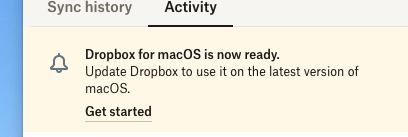
How to disable "Update" notification on MacOS
Dropbox's new launch on MacOS essentially cripples Dropbox (spotlight is broken, finder cannot search, external drive cloud storage is disabled, etc.)
So reverting to the older version fixes all th...

Nancy Dropbox Community Moderator
3 years agoDropbox Community ModeratorHi dragononamac, and thanks for posting your question here.
I’m afraid that it’s not possible to remove this notification completely.
In general, installing the new Dropbox update for MacOS is mandatory, as it was developed to adhere to the requirements that were set out by Apple.
I’ve sent your feedback though to our team, so that they can also see your comments.
I’ll be around the forum, if you need something else.

dragononamac
3 years agoCollaborator | Level 8
I understand but it doesn’t work for me so if Dropbox are going to force me to update I’ll have to transition to a competitor such as pCloud, which doesn’t force this upon me
I believe Dropbox should offer users the option between new and retain old functionality
I believe Dropbox should offer users the option between new and retain old functionality
About Apps and Installations
Have a question about a Dropbox app or installation? Reach out to the Dropbox Community and get solutions, help, and advice from members.
The Dropbox Community team is active from Monday to Friday. We try to respond to you as soon as we can, usually within 2 hours.
If you need more help you can view your support options (expected response time for an email or ticket is 24 hours), or contact us on X, Facebook or Instagram.
For more info on available support options for your Dropbox plan, see this article.
If you found the answer to your question in this Community thread, please 'like' the post to say thanks and to let us know it was useful!


