Your workflow is unique 👨💻 - tell us how you use Dropbox here.
Forum Discussion

Podblast
3 years agoExplorer | Level 3
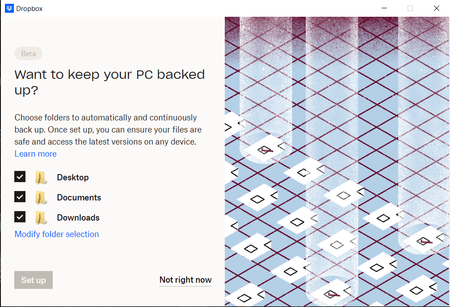
I cannot setup Dropbox Backup on my Basic account. Set up grayed out.
During installation I am encouraged to turn on the Dropbox Backup feature.
I would love to! Why can't I click "Set up" to continue?
Things I've tried:
- Click "Not right now"...

Megan Dropbox Community Moderator
3 years agoDropbox Community ModeratorHi Podblast, welcome to our Community!
First of all, amazing job on your troubleshooting there!
Out of curiosity, if you uncheck any of the paths shown on your screenshot, and instead of all 3 you choose to sync 2 or 1 of them, does it then allow you to proceed maybe?
Let me know more!
 Podblast3 years agoExplorer | Level 3Hi Megan,
It does not matter what options I select. None, one, all, or a few.
The button remains disabled.- Hannah3 years ago
Sorry to jump in here, Podblast.
I know you're not getting any error messages, when trying to set up the backup, but can you follow these troubleshooting steps (when applicable), to see if they help?
- Podblast3 years agoExplorer | Level 3
Hi Hannah,
I've exited every application I could think of that could be using my Desktop (it was a short list) and folder permissions look set correctly already.
I have also done the usual troubleshooting routine: Restart machine. Update Windows.
Still no option to use this feature...

About Apps and Installations
Have a question about a Dropbox app or installation? Reach out to the Dropbox Community and get solutions, help, and advice from members.
The Dropbox Community team is active from Monday to Friday. We try to respond to you as soon as we can, usually within 2 hours.
If you need more help you can view your support options (expected response time for an email or ticket is 24 hours), or contact us on X, Facebook or Instagram.
For more info on available support options for your Dropbox plan, see this article.
If you found the answer to your question in this Community thread, please 'like' the post to say thanks and to let us know it was useful!


