Your workflow is unique 👨💻 - tell us how you use Dropbox here.
Forum Discussion

Podblast
3 years agoExplorer | Level 3
I cannot setup Dropbox Backup on my Basic account. Set up grayed out.
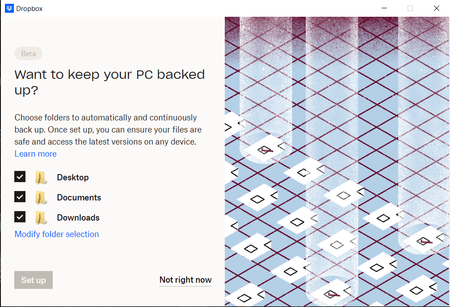
During installation I am encouraged to turn on the Dropbox Backup feature.
I would love to! Why can't I click "Set up" to continue?
Things I've tried:
- Click "Not right now"...

Podblast
3 years agoExplorer | Level 3
Hi Hannah,
I've exited every application I could think of that could be using my Desktop (it was a short list) and folder permissions look set correctly already.
I have also done the usual troubleshooting routine: Restart machine. Update Windows.
Still no option to use this feature...

Walter Dropbox Community Moderator
3 years agoDropbox Community ModeratorHey Podblast, sorry to jump in here, but could you try setting the Backup from the website, directly from this page?
Let us know how it goes!
- Podblast3 years agoExplorer | Level 3
Hi Walter,
This page will prompt me to open a link to the Dropdox desktop app.
Clicking through, next I see a new page including a "Get Started" button to start setting up Dropbox Backup.
When I click this button I see the same "Want to keep your PC backed up?" prompt with the same "Set up" button that is greyed out that I've been previously getting to via -> Preferences -> Backups tab -> Manage backups button.
It seems clear to me that there is an intended check or sequence of checks in the code running the Dropdox desktop app that is deciding to grey out and disable the "Set up" button. Surely I cannot be running a unique enough combination of Dropbox plus Windows plus whatever-else that this can elude your team from replicating.
I've long since found a work-around for my needs that circumvents the need for Dropbox Backup, but I would love to know why it never let me set it up. If this were my project, I would recommend adding some text to display to the user whenever the Set up button is disabled to explain why, or at the very least to display some sort of error code that I, or the next person, could relay to you or lookup in your FAQ/documentation and learn what is going on.
If you are interested to know, my workaround was to use the Windows mklink tool and create a junction directory from where I wanted to use Dropdox desktop to backup, and instead I've moved that directory into the manual Dropbox folder.
Happy to try any other ideas you have, or if you have figured out a solution for why this Set up button is disabled I would love to learn why.
Thanks
 hello_box113 years agoExplorer | Level 4Hey Podblast, I guess your machine might somehow ran into an edge case that was not accounted for. Could you sign out and sign in again, and restart Dropbox to see if that will fix the problem?
- Podblast3 years agoExplorer | Level 3
Hi hello_box11
Logging out and in again seems to re-initiate the setup process.
Once I selected to keep my files Local Only it reaches the Dropbox Backup feature and once again the option to continue is disabled.
Thanks!
About Apps and Installations
Have a question about a Dropbox app or installation? Reach out to the Dropbox Community and get solutions, help, and advice from members.
The Dropbox Community team is active from Monday to Friday. We try to respond to you as soon as we can, usually within 2 hours.
If you need more help you can view your support options (expected response time for an email or ticket is 24 hours), or contact us on X, Facebook or Instagram.
For more info on available support options for your Dropbox plan, see this article.
If you found the answer to your question in this Community thread, please 'like' the post to say thanks and to let us know it was useful!


