Your workflow is unique 👨💻 - tell us how you use Dropbox here.
Forum Discussion

Podblast
3 years agoExplorer | Level 3
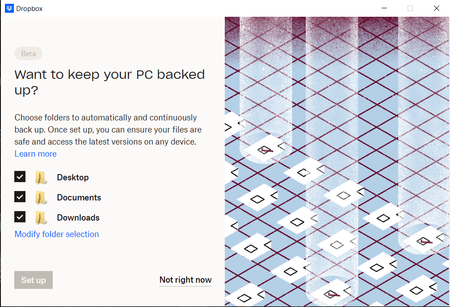
I cannot setup Dropbox Backup on my Basic account. Set up grayed out.
During installation I am encouraged to turn on the Dropbox Backup feature.
I would love to! Why can't I click "Set up" to continue?
Things I've tried:
- Click "Not right now"...

Megan Dropbox Community Moderator
3 years agoDropbox Community ModeratorHi Podblast, I just sent you an email!
I'll be more than happy to continue troubleshooting with you there. Cheers!

RR88
3 years agoNew member | Level 2
Hi,
I am getting exact same problem on my win10(22H2) now, I tried everything as on the post, any updates for solutions?
 Podblast3 years agoExplorer | Level 3Hi RR88,
I’m currently waiting on a response from the engineering team about this.
If we end up coming up with a solution or a root cause I will post it here.- Hannah3 years ago
Hey Podblast, we appreciate you still being here and please do update us, when you have more info!
As for you RR88, can you let us know if you have the most recent stable version of the app installed?
You can see this info, by hovering over the Dropbox icon in your system tray.
 aristeidist2 years agoExplorer | Level 4
I have exacly the same problem! Jesus!
- Walter2 years ago
Hey aristeidist, sorry to hear about this.
Can you please let us know if you've attempted any troubleshooting steps like rebooting your computer or reinstalling the app at all since you first noticed this?
If you did and this persists, can you let us know the app's exact status and version as shown in your menu bar/system tray and clarify your computer's exact OS version?
Thanks so much!
- aristeidist2 years agoExplorer | Level 4Yes I have tried all these and more (such as completely uninstalling onedrive).It s Windows 11 and have downloaded and re installed the latest dropbox app.
- Hannah2 years ago
Hey aristeidist, can you please let us know the exact version of the Dropbox app that you have installed?
- aristeidist2 years agoExplorer | Level 4
169.4.5684
- Hannah2 years ago
Thanks, aristeidist!
Can you please check if you can enable backup from the backup page in your account online?
- aristeidist2 years agoExplorer | Level 4
I go "manage backups" and then "open backup settings" which opens the app in my PC and has the same problem
- aristeidist2 years agoExplorer | Level 4
FYI the app crashes in this screen and does not respond at all that and does not respond at all.
 hello_box112 years agoExplorer | Level 4Can u try to upgrade to v170? I think that should fix the issue
- Walter2 years ago
Hey aristeidist, did you had any luck with the most recent version of the app?
- aristeidist2 years agoExplorer | Level 4
I will try in a few days that I will have acces to that PC again and let you know. Thanks for the feedback.
- aristeidist2 years agoExplorer | Level 4
I downbloaded v.170.4.5895. Still same problem
- Megan2 years ago
Hi aristeidist, can I send you an email, in order for us to have a closer look into this?
- aristeidist2 years agoExplorer | Level 4Yea please!
- Megan2 years ago
Hi aristeidist, I just sent you an email, I'll see you there!
 Wannachupbrew2 years agoNew member | Level 2
I'm having the same issue and have followed all of the troubleshooting steps in this thread, but no luck so far. I'm on 171.3.6099
- Megan2 years ago
Hi Wannachupbrew, welcome to our Community!
Now, based on the info you provided, it seems you're using our Beta version. This could be the culprit of your Backup issue.
As a first step, I would suggest that you downgrade from the beta version. You can go into your account settings on the Dropbox website and turn Early releases off. After that, install one of the stable builds of the Dropbox application.
Keep me posted on the results!
- Wannachupbrew2 years agoNew member | Level 2
Sorry, I should have also mentioned that I had the issue on the stable build too (170.4.5895) which is what made me try the beta to see if it was fixed. Just tried 170.4.5895 again and I'm still having the issue on both builds.
- Megan2 years ago


About Apps and Installations
Have a question about a Dropbox app or installation? Reach out to the Dropbox Community and get solutions, help, and advice from members.
The Dropbox Community team is active from Monday to Friday. We try to respond to you as soon as we can, usually within 2 hours.
If you need more help you can view your support options (expected response time for an email or ticket is 24 hours), or contact us on X, Facebook or Instagram.
For more info on available support options for your Dropbox plan, see this article.
If you found the answer to your question in this Community thread, please 'like' the post to say thanks and to let us know it was useful!


