Your workflow is unique 👨💻 - tell us how you use Dropbox here.
Forum Discussion

nandom111
10 months agoNew member | Level 2
I can't open the app, reinstalling doesn't work.
Salve,
quando cerco di avviare l'app Dropbox su Mac mi compare il messaggio "Impossibile avviare Dropbox". L'app ha sempre funzionato sino a ieri. Cosa posso fare? Ho già provato a disinstallare e ...
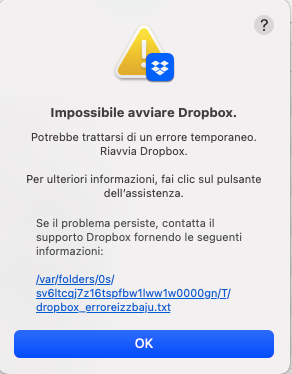
- 10 months ago
I see, thanks for the error log nandom111
Can you perform an advanced reinstall and let us know if you get the same results?


nandom111
10 months agoNew member | Level 2
It worked, thanks

Theresa Community Manager
10 months agoCommunity ManagerHi nandom111 and welcome to the Dropbox Community. I am glad to see that an advanced reinstall fixed your issue and you were once again able to use your Dropbox account at full functionality.
On a separate note, I’m Theresa, one of the Community Managers here at Dropbox. 👩💻 I’d love to hear how you use Dropbox in your daily life and sure if you're open to sharing, I’m all ears👂✨.
I’m always fascinated by different workflows. Who knows? Your insights might lead to helpful tips to boost productivity or even spark ideas we can share with our internal team. 🤗💡
T 😺 (Dropbox Community Manager)
About Apps and Installations
Have a question about a Dropbox app or installation? Reach out to the Dropbox Community and get solutions, help, and advice from members.
The Dropbox Community team is active from Monday to Friday. We try to respond to you as soon as we can, usually within 2 hours.
If you need more help you can view your support options (expected response time for an email or ticket is 24 hours), or contact us on X, Facebook or Instagram.
For more info on available support options for your Dropbox plan, see this article.
If you found the answer to your question in this Community thread, please 'like' the post to say thanks and to let us know it was useful!


