Your workflow is unique 👨💻 - tell us how you use Dropbox here.
Forum Discussion

Rhoufi
4 hours agoNew member | Level 2
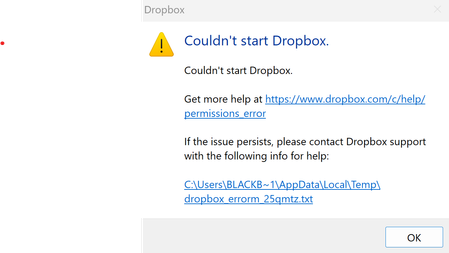
I get an error that the Dropbox app can't start after installing it on my Windows device.
The error file is as follows:
bn.BUILD_KEY: Dropbox
bn.VERSION: 243.4.6956
bn.constants.WINDOWS_SHELL_EXT_VERSION: 90
bn.is_frozen: True
machine_id: fb77be58-97d3-4be1-8b70-5fb2483...

Rich Super User II
2 hours agoSuper User IIRhoufi wrote:appdata: 'C:\\Users\\Kimpan\\AppData\\Local\\Dropbox\\instance1'
Rhoufi wrote:TMP: C:\Users\BLACKB~1\AppData\Local\Temp
Rhoufi wrote:PermissionError: [WinError 5] Access is denied: 'C:\\Users\\Kimpan\\AppData\\Local\\Dropbox'
Did you rename your user account or profile directory, and had a previous Dropbox install? The errors indicate that you're signed in to one Windows user account while Dropbox is looking for files in the profile of another user account. It's expected that one user account wouldn't have access to the profile of another, hence the access denied error.
I'd perform an advanced re-install of Dropbox so that all the previous information is cleared before installing again.
About Apps and Installations
Have a question about a Dropbox app or installation? Reach out to the Dropbox Community and get solutions, help, and advice from members.
The Dropbox Community team is active from Monday to Friday. We try to respond to you as soon as we can, usually within 2 hours.
If you need more help you can view your support options (expected response time for an email or ticket is 24 hours), or contact us on X, Facebook or Instagram.
For more info on available support options for your Dropbox plan, see this article.
If you found the answer to your question in this Community thread, please 'like' the post to say thanks and to let us know it was useful!


