Need to see if your shared folder is taking up space on your dropbox 👨💻? Find out how to check here.
Forum Discussion

Carolb7821
2 years agoExplorer | Level 3
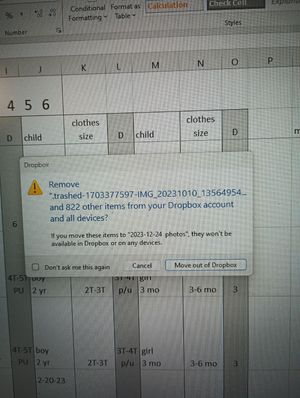
I'm asked if I want to move files out of Dropbox, and then my Windows desktop fills up with them
Message #2 after hitting cancel for message #1 Desktop view after message #1 Message #1I have had this issues for a few months now. I will be working on a spread sheet or reading emails whe...

Nancy Dropbox Community Moderator
2 years agoDropbox Community ModeratorThanks for the updates, Carol! Were any of the files within your local Dropbox folder accidentally dragged out of it at any certain point, before receiving this notification?
If not, and you’re not on a free Basic plan with more than 3 devices currently linked, feel free to reinstall the app and let me know if the same behavior persists after that.

Carolb7821
2 years agoExplorer | Level 3
Thank you Nancy. There were no files drug out of the Dropbox folder to the desk top. I have uninstalled and reinstalled the app. I'll see what happens now.
About Apps and Installations
Have a question about a Dropbox app or installation? Reach out to the Dropbox Community and get solutions, help, and advice from members.
The Dropbox Community team is active from Monday to Friday. We try to respond to you as soon as we can, usually within 2 hours.
If you need more help you can view your support options (expected response time for an email or ticket is 24 hours), or contact us on X, Facebook or Instagram.
For more info on available support options for your Dropbox plan, see this article.
If you found the answer to your question in this Community thread, please 'like' the post to say thanks and to let us know it was useful!


