Your workflow is unique 👨💻 - tell us how you use Dropbox here.
Forum Discussion

The TechJedi
4 years agoHelpful | Level 5
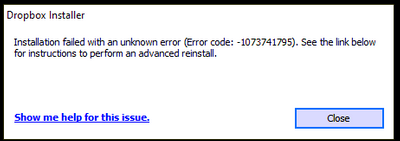
Installation Failed Error Code 1073741795
I keep getting the same error over and over again. I have tried every suggested resolution and nothing has worked. Anyone?
- 3 years ago
Our engineers have put out a new Beta Build: 150.3.4929, which fixes the 'Installation failure: Error code 1073741795'. You can find details about the fix, and how to install it, here.


Jay Dropbox Community Moderator
4 years agoDropbox Community ModeratorFor instance, Boxifier in the past has been known to prevent the Dropbox desktop application from updating.
If the app hasn't been installed with admin privileges, there could be similar issues.
If you're not on a Dropbox Basic plan with more than 3 devices connected, you could try an advanced reinstall of the app using the steps in this link?
If the app hasn't been installed with admin privileges, there could be similar issues.
If you're not on a Dropbox Basic plan with more than 3 devices connected, you could try an advanced reinstall of the app using the steps in this link?

JenTo
4 years agoHelpful | Level 7
Yes, I am on the Dropbox basic plan, and in devices I see my old phone (which I have now removed) and my current phone. Up until yesterday my computer was also connected and that is still not happening.
*Edited to add: I do see under "Connected Apps" my phone manufacturer (Samsung) and as far as I know, this was required on my old phone to connect to Dropbox, but I'm not sure it is required for my new phone. Is there somewhere I can find those permissions to check?*
I looked at the advanced reinstall instructions you linked to and I am not comfortable editing the registry on my computer. Also, since I uninstalled the desktop app, the linked Dropbox folder does not appear on my computer any longer.
Do I have any next step?
About Apps and Installations
Have a question about a Dropbox app or installation? Reach out to the Dropbox Community and get solutions, help, and advice from members.
The Dropbox Community team is active from Monday to Friday. We try to respond to you as soon as we can, usually within 2 hours.
If you need more help you can view your support options (expected response time for an email or ticket is 24 hours), or contact us on X, Facebook or Instagram.
For more info on available support options for your Dropbox plan, see this article.
If you found the answer to your question in this Community thread, please 'like' the post to say thanks and to let us know it was useful!


