Your workflow is unique 👨💻 - tell us how you use Dropbox here.
Forum Discussion

simpson b.
3 months agoCollaborator | Level 8
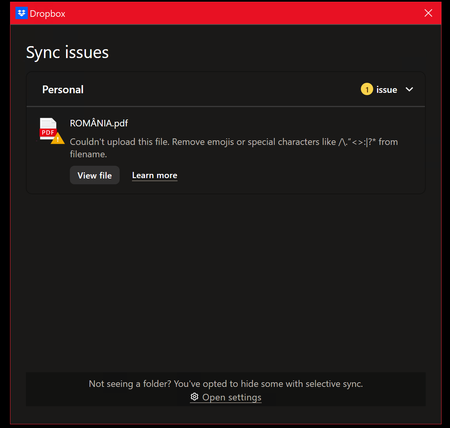
I've renamed my file, but the desktop app still says it can't sync it, even though it has.
Application Affected
Dropbox Desktop Windows 10 Device
Windows 10 on Xeon E5 Operating System/Browser (if using the web)
Windows 10.0.18363.1256 Dropbox App Version (if using the app) ...
 3 months ago
Follow-up? It's a bug report. Does nobody read these? What am I saying, the suggestion was to restart a system clearly stated to be mission critical. Of course it wasn't.
Let me rephrase it.ERROR MSG NO GO AWAY AFTER CONFLICT ALREADY SOLVED. BUG, PLS FIX.

Nancy Dropbox Community Moderator
3 months agoDropbox Community ModeratorWelcome back to the Community, simpson b.!
Have you already restarted your computer and the Dropbox app and the error is still there?
If you have, and you’re not on a free Basic plan with more than 3 devices currently linked to Dropbox, I’d like you to reinstall the desktop app next, as a test.
Let me know, if any of the above helps.
About Apps and Installations
Have a question about a Dropbox app or installation? Reach out to the Dropbox Community and get solutions, help, and advice from members.
The Dropbox Community team is active from Monday to Friday. We try to respond to you as soon as we can, usually within 2 hours.
If you need more help you can view your support options (expected response time for an email or ticket is 24 hours), or contact us on X, Facebook or Instagram.
For more info on available support options for your Dropbox plan, see this article.
If you found the answer to your question in this Community thread, please 'like' the post to say thanks and to let us know it was useful!


