Your workflow is unique 👨💻 - tell us how you use Dropbox here.
Forum Discussion

twid
3 years agoExplorer | Level 4
Mac OS Ventura - incompatible?
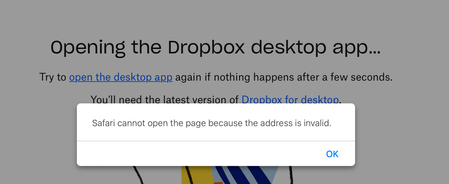
I am a new premium subscriber as of yesterday. I updated to MacOS Ventura on Wednesday. Trying to open the Dropbox desktop app and I receive the error above.
Thanks,
- 3 years ago


Megan Dropbox Community Moderator
3 years agoDropbox Community ModeratorHey radlyeel, I'd be happy to help!
It might sound trivial, but have you tried to reboot your device? After that, can you try to run the installer again? Let me know if you get any specific errors too.
Keep me posted!

radlyeel
3 years agoExplorer | Level 4
Hi, Megan. It's never trivial to suggest what I should have thought of myself! But alas, that changed nothing. But I'm open to more suggestions.
- Megan3 years ago
Hey radlyeel, have you checked to see if you have any anti-virus or other security applications running, that could be preventing the installation? Try disabling them temporarily while you install our app, and be sure to check your router for anything that could be blocking it as well.
Also, if you check your Applications folder, do you see Dropbox listed there?
- radlyeel3 years agoExplorer | Level 4
No antivirus, no router issue. (Not a day passes without me installing something. No other products are problematic.) I do get a Dropbox app in my Applications folder. Launching it just opens Finder on my Dropbox folder. I just opened Security &Privacy, and Dropbox is given access to Downloads Folder, Network Volumes, and Removable Volumes
- Hannah3 years ago
Hey radlyeel, sorry to jump in here.
Since you have a Dropbox app in your applications folder, which does open the Dropbox folder in your Finder, can you check if you have a Dropbox icon in your menu bar?
If so, can you hover over it with your mouse to see the status and version of the app?
- radlyeel3 years agoExplorer | Level 4
I do not have the Dropbox icon in my menu bar.
However, the Terminal command '$ps ax | grep -i dropbox' filled up my terminasl window. So I think I'll pull on that thead and see what i learn. I'll be back.
- radlyeel3 years agoExplorer | Level 4
I'm back. As mentioned, I had a ton of output, some rather bizarre looking, from "ps ax | grep -i dropbox". So I "kill"ed all those and re-ran the "offline omstaller", Dropbox 161.4.4923.dmg, with the same result, it just opened Finder on the Dropbox folder. So I checked processes again. I have one that is "type: crashpad-handler, with a "minidump" included. If that would be interesting to someone, I can send it along.
- Hannah3 years ago
Thanks for the additional info, radlyeel.
Just out of curiosity, does the Dropbox folder in your Finder have your files in it, or is it empty?
And if it does have your files in it, does it sync? Like, if you add a file to it, does it show up in your account online?
- radlyeel3 years agoExplorer | Level 4
As a matter of fact, syncing is happening--in both directions. I have an Intel iMac that I "ssh into" daily, Also connected to my Dropbox account. So I just now created a tes fil in my Dropbox folder, ssh'ed ito my iMac, added some txt to it, and ten saw that text on my laptop. Also, Finder is now showing the sync progress inicators in my Dropbox folder. But I don't have a Dropbox icon in my mernubar, so I have no way of changing the sync settings.
- radlyeel3 years agoExplorer | Level 4
I sort of hope other people have this problem---I'd hate to think I was creating so much.
work for you! Thanks for putting in the effort.
I checked online and everything is there as it should be. I'va attache two screenshots. The one of the icons in the Finder window as called icons-stable because I wanted to grab another shot with an in-progress icon, but
I wasn't quick enough. Also, I didn't invest any time to prettify the layout. I expected to find a littl paperclip icon for attaching files but the closest I coul get was a camera to insert photos. Let me know if there's a better way.
menubaricons-stable
- radlyeel3 years agoExplorer | Level 4
One final post on this subject, and then I'm back at work. I was utterly perplexed -- syncing was happening, but no control. Then a few minutes ago I had other reasons to close a few of the apps in my menu bar. After the second one, Dropbox came out of hiding. It had gotten pushed over to the black gap around the camera on my laptop (see accompanying photo). A screen shot doesn't show the gap. My faith in Dropbox is restored. Apple, not so much. Gap in Macbook menu bar.


About Apps and Installations
Have a question about a Dropbox app or installation? Reach out to the Dropbox Community and get solutions, help, and advice from members.
The Dropbox Community team is active from Monday to Friday. We try to respond to you as soon as we can, usually within 2 hours.
If you need more help you can view your support options (expected response time for an email or ticket is 24 hours), or contact us on X, Facebook or Instagram.
For more info on available support options for your Dropbox plan, see this article.
If you found the answer to your question in this Community thread, please 'like' the post to say thanks and to let us know it was useful!


