Your workflow is unique 👨💻 - tell us how you use Dropbox here.
Forum Discussion

twid
3 years agoExplorer | Level 4
Mac OS Ventura - incompatible?
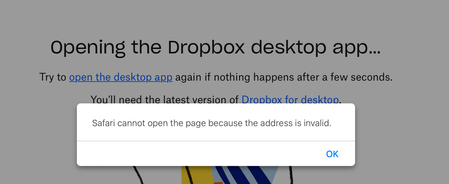
I am a new premium subscriber as of yesterday. I updated to MacOS Ventura on Wednesday. Trying to open the Dropbox desktop app and I receive the error above.
Thanks,
- 3 years ago

Hannah Dropbox Community Moderator
2 years agoDropbox Community ModeratorI understand where you're coming from, raffishtenant.
Hopefully, the app will finish syncing soon, but if there's an issue, e.g. it gets completely stuck, do let us know!

raffishtenant
2 years agoHelpful | Level 6
Hi Hannah, thanks again. I will certainly keep you informed. At the moment, it may be a bit difficult for us to gauge whether it has "completely stopped": every time we think it has, it throws us a tiny bone or two. For example:
• The status bar reads "Everything is up to date" the vast majority of the time. However, every once in a while, it says something like "Updating 1 file," then goes back to "Everything is up to date."
• We have DaisyDisk keeping constant watch on how much disk space (including "hidden space") it believes is in use. This figure has been hovering around 148.8GB for the past few hours. Every once in a while, it will elevate to as much as 2GB more than that, then suddenly drop back down.
To me, this sounds as though a background process is occasionally touching one or more of our files on Dropbox, and Dropbox is attempting to keep those files synced. There's very little to go on in the interface. There's a single file from the last 12 hours under both "Activity" and "Sync and backups," and when we look at that file in the Finder, it is not in fact synced: double-clicking on it briefly shows the "filling circle" icon as it downloads.
So, yeah. I would say that, for all intents and purposes, it has in fact completely stopped. But if this is somehow the expected behavior, and we should hold out hope that something more will eventually happen, we are nothing if not patient.
In the meantime, I'm going to back and re-click the "download from cloud" icons on all of the top-level subfolders and see if maybe the third time will be the charm. 🙂
About Apps and Installations
Have a question about a Dropbox app or installation? Reach out to the Dropbox Community and get solutions, help, and advice from members.
The Dropbox Community team is active from Monday to Friday. We try to respond to you as soon as we can, usually within 2 hours.
If you need more help you can view your support options (expected response time for an email or ticket is 24 hours), or contact us on X, Facebook or Instagram.
For more info on available support options for your Dropbox plan, see this article.
If you found the answer to your question in this Community thread, please 'like' the post to say thanks and to let us know it was useful!


