Your workflow is unique 👨💻 - tell us how you use Dropbox here.
Forum Discussion

twid
3 years agoExplorer | Level 4
Mac OS Ventura - incompatible?
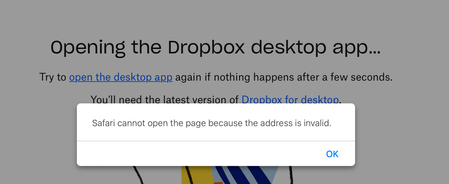
I am a new premium subscriber as of yesterday. I updated to MacOS Ventura on Wednesday. Trying to open the Dropbox desktop app and I receive the error above.
Thanks,
- 3 years ago

Hannah Dropbox Community Moderator
2 years agoDropbox Community ModeratorI understand where you're coming from, raffishtenant.
Hopefully, the app will finish syncing soon, but if there's an issue, e.g. it gets completely stuck, do let us know!

Annstringer
2 years agoExplorer | Level 4
@Hannah
I am the owner of this account. @RaffishTenant is helping me.
THIS IS COMPLETELY UNACCEPTABLE.
The files will not sync down reliably or permanently. When a handful of files do come down (which appears to happen haphazardly), they inevitably become unsynced before we can even bother to copy them elsewhere.
I have lost faith in Dropbox and I want a full copy of all my files on the service. I cannot do that on my primary work machine, but there is no reason I shouldn't be able to do it on another Mac. I've done this many times before.
This is not us, this is your software. FIX IT.
@RaffishTenant is the person to contact about specific behavior, because he's been monitoring this, but I need you to fix your software. If I have to purchase a Windows machine just to get off of your service, you better believe I'm gonna hold Dropbox responsible for those costs. And I will make sure every designer, video editor and developer I know, knows how awful this has been.
FIX THIS.
About Apps and Installations
Have a question about a Dropbox app or installation? Reach out to the Dropbox Community and get solutions, help, and advice from members.
The Dropbox Community team is active from Monday to Friday. We try to respond to you as soon as we can, usually within 2 hours.
If you need more help you can view your support options (expected response time for an email or ticket is 24 hours), or contact us on X, Facebook or Instagram.
For more info on available support options for your Dropbox plan, see this article.
If you found the answer to your question in this Community thread, please 'like' the post to say thanks and to let us know it was useful!


