Need to see if your shared folder is taking up space on your dropbox 👨💻? Find out how to check here.
Forum Discussion

Kopfwerk
3 years agoExplorer | Level 3
Missing options from burger menu on web, like Replay and Transfer.
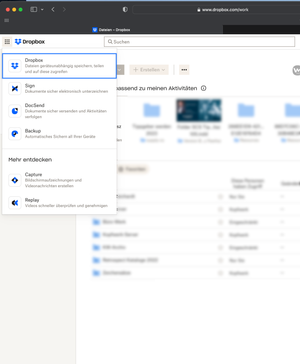
On Mac OS 13.5 using Safari 16.6 the main menu is not fully visible and gives no hints for further items to scroll to.
Some users might not find the tools below "Replay", like "Transfer".
...

Nancy Dropbox Community Moderator
3 years agoDropbox Community ModeratorWelcome to the Community, Kopfwerk!
Just to clarify, were you previously able to see the rest of the options on your web account, and you can no longer today?
Do you see the exact same thing if you try via another browser?
Also, are you currently on a Dropbox Business team? I'm asking in case some of these features have been disabled for the team (via the Admin Console).
If you're on Business indeed, can you clarify if the rest of the team members can see those features?
Let me know, and we’ll take it from there.

Kopfwerk
3 years agoExplorer | Level 3
Hi Nancy,
thanks for asking. I am the business account manager and I can access the options.
BUT:
The menu item "Transfer" is out of view because the drop down menu is too short in order to display all items. Please check my screenshot. I just checked with Firefox with the same result.
I can use Transfer, because I just know where it is. Other users might not know that. It is not a personal problem but a general bug or UI/UX issue as I see it.
Thanks.
Regards,
Matz
About Apps and Installations
Have a question about a Dropbox app or installation? Reach out to the Dropbox Community and get solutions, help, and advice from members.
The Dropbox Community team is active from Monday to Friday. We try to respond to you as soon as we can, usually within 2 hours.
If you need more help you can view your support options (expected response time for an email or ticket is 24 hours), or contact us on X, Facebook or Instagram.
For more info on available support options for your Dropbox plan, see this article.
If you found the answer to your question in this Community thread, please 'like' the post to say thanks and to let us know it was useful!


