Our Community is in read-only mode until April 8th, learn more here. You can still search existing threads or get help via Dropbox Support, the Dropbox Help Center, or Learn.
Forum Discussion

Deb918
1 year agoExplorer | Level 4
Moving Dropbox files to a "D" drive on Windows 11.
When I try to follow these instructions, I don't have a Move option.
Windows: Manually move the Dropbox folder back to its default location
Close any applications on your computer that may be ...
- 1 year ago
Hi Deb918, welcome to our Community!
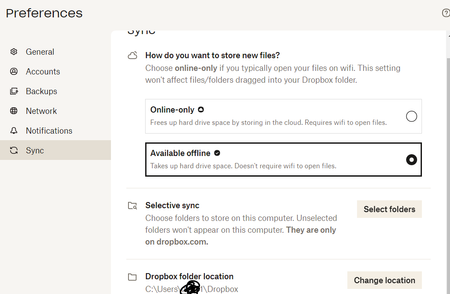
If you wish to change the path of your Dropbox folder, all you'd have to do is access the app's preferences (just like you did on the screenshot you sent me).
You can see that next to the Dropbox folder location it gives you the option to change its location.
That should do the trick. Want to give it a go, and let me know how it goes?
Thanks!

Deb918
1 year agoExplorer | Level 4
That worked, Megan. Thanks!

Megan Dropbox Community Moderator
1 year agoDropbox Community Moderator corkysru1 year agoNew member | Level 2
Hi, I know this is an older thread but tried exactly that (twice) and it has failed twice. I get a message saying that some files can't be moved (but it doesn't say what) and that I need to try again.
My C: drive is getting too full and I need to clear out some space but my F: drive is wonderfully empty.
When I try to move it it starts copying the files and seems to stall out after about 104GB when saved space is about 312GB. Are there log files somewhere I can access to see what files are causing the issues?
About Apps and Installations
Have a question about a Dropbox app or installation? Reach out to the Dropbox Community and get solutions, help, and advice from members.
The Dropbox Community team is active from Monday to Friday. We try to respond to you as soon as we can, usually within 2 hours.
If you need more help you can view your support options (expected response time for an email or ticket is 24 hours), or contact us on X, Facebook or Instagram.
For more info on available support options for your Dropbox plan, see this article.
If you found the answer to your question in this Community thread, please 'like' the post to say thanks and to let us know it was useful!


